

GitHub Hacked 2026: What Every Developer and Business Must Know Right Now?
Introduction
On May 20 2026, GitHub finally declared the breach of its internal repositories that security experts had been guessing for a few days. An attacker named TeamPCP stole data from almost 3,800 GitHub-internal repositories after luring an employee to download a poisoned VS Code extension that compromised the employee’s device.
That was far from a single isolated case. It is the third major GitHub-related security event in the past six weeks. At the end of April, security researchers at Wiz found CVE-2026-3854 a critical remote code execution vulnerability by which any authenticated user could launch arbitrary code on GitHub.com servers using only a git push command, exposing millions of public and private repositories. A few days later, on May 16, Grafana Labs, a leader in the observability space, announced that the attackers had stolen their entire private source code through a token theft.
If your company is coding on GitHub, and in fact, most of them do, then the question is not whether to worry. It’s about what to do in reality. GitHub’s hack in 2026 is not a single breach. It’s a pattern that is forcing every serious engineering team to rethink developer infrastructure security.
Let me share with you seven things that every developer and business must know right at this moment, with the specific steps to be taken this week.
1. The May 20 Breach: How It Actually Happened
GitHub’s official statement was brief but specific. A threat actor compromised an employee’s device by exploiting a malicious Visual Studio Code extension targeting the developer supply chain rather than GitHub’s platform infrastructure directly.
How the Attack Actually Worked?
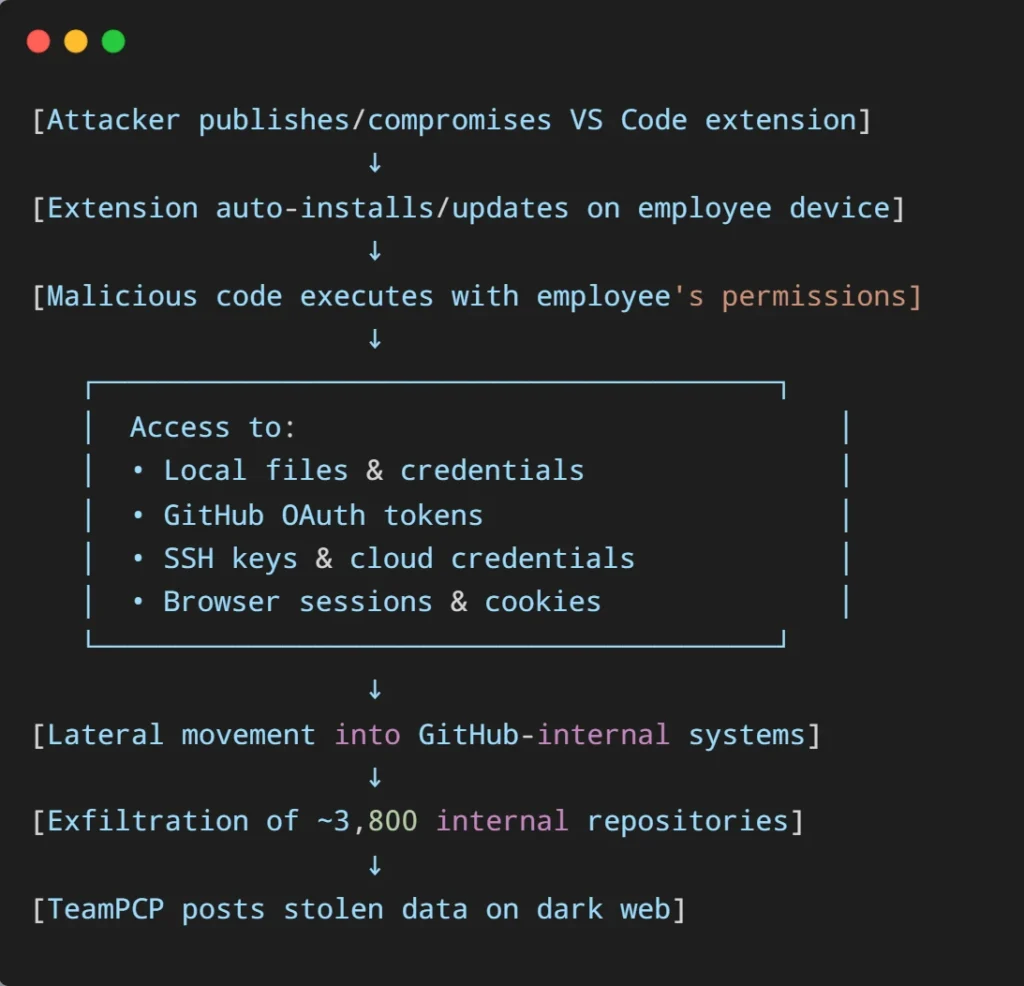
The danger isn’t in any single step; it’s that each step uses legitimate access the employee already had. No firewall blocked it. No 2FA prompt fired. The attack looked exactly like normal developer activity, because functionally, it was normal developer activity – just executed by code the developer didn’t write.
What the attacker accessed:
- Approximately 3,800 GitHub-internal repositories (confirmed by GitHub as “directionally consistent” with TeamPCP’s claims).
- Source code and organization data from internal-only systems.
- No customer data exposure confirmed at this stage.
What GitHub did:
- Identified the poisoned VS Code extension and removed it.
- Isolated the compromised employee’s device.
- Activated incident response procedures.
- Committed to publishing a full incident report after review.
The technique matters more than the immediate damage. Attackers in 2026 increasingly target the tools developers use to build software rather than the platforms that host it. A single malicious extension installed by one employee gave attackers access to internal systems at one of the world’s most critical pieces of software infrastructure.
This is the same pattern we documented in our broader analysis of why AI projects fail. The most expensive failures aren’t usually technology failures. They’re trust failures in the systems and humans surrounding the technology.
2. CVE-2026-3854: The Vulnerability That Exposed Millions of Repositories
Six weeks before the May 20 breach, GitHub faced a different but equally serious incident. On April 28, security researchers at Wiz disclosed CVE-2026-3854 – a critical remote code execution vulnerability that allowed any authenticated GitHub user to execute arbitrary commands on GitHub’s backend servers.
The exploitation was disturbingly simple: a logged-in user with a standard git client could run a single git push command and execute code on GitHub.com’s shared storage nodes. According to Wiz, this allowed access to millions of public and private repositories belonging to other users and organizations on the affected nodes.
For GitHub Enterprise Server customers, the impact was even more severe – full server compromise, access to all repositories, and exposure of internal secrets.
GitHub patched the vulnerability quickly and confirmed it wasn’t exploited in the wild before discovery. But the existence of this flaw, combined with two other GitHub-related breaches in the same window, is what’s making engineering leaders ask harder questions about where their code actually lives.
3. The Pattern: GitHub Hacked 2026 Is About Developer Supply Chains
It’s no accident that we’ve seen several big security issues involving GitHub in just six weeks. This really points to a change in how attackers are operating. Here’s a clear rundown of what’s happened recently:
May 20, 2026 – GitHub Internal Breach
- What happened: An employee’s computer got infected by a bad VS Code extension. This let hackers steal about 3,800 of GitHub’s own private code repositories.
- Attacker: TeamPCP.
- Impact: This only affected GitHub’s internal code, and they haven’t found any customer data that was exposed.
May 18-19, 2026 – Malicious GitHub Action
- What happened: It turned out that a widely used tool called ‘issues-helper Action‘ was actually designed to steal login details from workflows. This was a tricky attack targeting the software supply chain.
- Impact: Any project that used the affected version of this tool ended up exposing its sensitive CI/CD secrets.
May 16, 2026 – Grafana Labs Breach
- What happened: Hackers managed to exploit a security hole called “Pwn Request” in a wrongly set up GitHub Action. This lets them grab a special access token and download all of Grafana’s private code.
- Outcome: A group called CoinbaseCartel tried to demand money, but Grafana publicly said no.
April 28, 2026 – CVE-2026-3854 Disclosed
- What happened: A very serious security flaw (known as CVE-2026-3854) that could allow remote code execution was found in GitHub.com and their Enterprise Server. Researchers from Wiz discovered it with the help of AI for security analysis.
- Impact: Millions of code repositories, both public and private, became vulnerable on the systems that were affected.
March 23, 2026 – Checkmarx Supply Chain Attack
- What happened: Hackers tampered with two GitHub Actions workflows and two VS Code marketplace plugins, turning them into tools to steal login information.
- Cascading impact: This briefly led to the compromise of the Bitwarden CLI npm package.
The common thread: What all these events have in common is clear: hackers aren’t trying to directly break into GitHub’s main platform anymore. Instead, they’re going after the whole developer world built around GitHub – things like extensions, Actions, access tokens, employee devices, and other third-party tools. GitHub’s platform itself is pretty secure. It’s the tools and systems developers use to work with GitHub that are now the biggest weakness.
4. Why VS Code Extensions Are the New Attack Vector?
The May 20 breach happened through a poisoned VS Code extension – and this attack pattern is accelerating across the industry. The numbers tell the story:
- VS Code Marketplace hosts over 70,000 extensions.
- Most extensions request broad permissions that developers approve without reading.
- Extensions can execute code, access files, intercept network requests, and read clipboard content.
- Updates are typically auto-installed without user review.
- Marketplace verification doesn’t catch malicious code added in updates after publication.
The attack model is brutal in its simplicity. Attackers publish a useful, popular extension (or compromise an existing one), build trust over months, then push a malicious update that exfiltrates credentials, source code, or installs further malware. The Checkmarx incident in March followed exactly this pattern with Open VSX marketplace plugins.
For organizations running AI-assisted development workflows – including Claude Code as a co-engineer – this matters even more. AI coding tools often integrate with the same VS Code ecosystem, which means a compromised extension could potentially access not just your code but the AI tools accessing your code, your tokens, and your CI/CD credentials.
5. What This Means for Your Business?
If you’re running any serious software development on GitHub, the GitHub hacked 2026 events should change your security posture this week. The concrete business risks:
- Source code exposure. Your most valuable IP is often your codebase. A breach exposes proprietary algorithms, business logic, and architectural decisions to competitors and attackers.
- Credential leakage. Codebases often contain hardcoded secrets, API keys, database credentials, and internal documentation that should never see the outside world. CISA itself recently leaked AWS GovCloud keys via a public GitHub repository – proof that even cybersecurity authorities make this mistake.
- Supply chain compromise. If your code depends on packages or actions that were tampered with, your production systems could be silently compromised without any direct attack on your own infrastructure.
- Customer trust impact. Even when customer data isn’t directly affected, public disclosure of a code breach erodes confidence.
- Enterprise sales cycles are slowing. Security questionnaires get harder. Investor due diligence raises new concerns.
- Regulatory exposure. Organizations in healthcare, finance, and government face specific compliance requirements around source code security. A breach can trigger reporting obligations and audit consequences.
The pattern matches what we’ve been documenting in broader business security discussions – the question isn’t whether your infrastructure will be tested. It’s whether you’ve prepared for the test. This applies whether you’re running hyperautomation systems in 2026 or traditional development workflows.
6. The 7-Step Action Plan for This Week
The good news: every action below is something your team can implement immediately, and most don’t require buying new tools.
Step 1: Audit VS Code Extensions Across Your Team
- Why it matters: The May 20 GitHub breach started with a poisoned VS Code extension on a single employee’s device.
- What to do: Have every developer review their installed VS Code extensions and remove any they don’t actively use. Document the approved extension list and enforce it organization-wide.
- Time required: 30 minutes per developer.
Step 2: Rotate GitHub Tokens and Audit Access
- Why it matters: Stale tokens with broad permissions are how attackers persist after an initial compromise.
- What to do: Audit every Personal Access Token, OAuth app, and GitHub Action with repository access. Revoke anything not actively used. Rotate any tokens older than 90 days. Enforce least-privilege scopes.
- Time required: Half-day project for most organizations.
Step 3: Lock Down GitHub Actions Permissions
- Why it matters: The Grafana breach happened through a misconfigured pull_request_target workflow that granted external contributors access to production secrets.
- What to do: Review every workflow file. Move secrets to environment-level protection rules. Disable workflows from external contributors on sensitive repositories.
- Time required: 1-2 days for a typical engineering org.
Step 4: Enable Push Protection and Secret Scanning
- Why it matters: Catches leaked credentials before they get committed, not after the CISA AWS GovCloud incident would have been prevented by this.
- What to do: Enable GitHub’s free secret scanning for all repositories and push protection for paid plans, organization-wide.
- Time required: Under 30 minutes for org admins.
Step 5: Deploy Canary Tokens
- Why it matters: Grafana detected its breach when an attacker triggered one of its canary tokens. Without that, the attack would have stayed undetected longer.
- What to do: Deploy fake credentials that look real but alert your security team when anyone tries to use them. Place them in code repositories, configuration files, and documentation.
- Time required: 2-3 hours to set up; minimal ongoing maintenance.
Step 6: Review Dependency Sources
- Why it matters: The Checkmarx attack cascaded through npm to briefly compromise the Bitwarden CLI package – supply chain attacks spread fast.
- What to do: Audit your package.json, requirements.txt, go.mod, or equivalent dependency manifests. Lock versions. Use Dependabot, Renovate, or Snyk to track changes. Be especially cautious of dependencies added in the last 90 days.
- Time required: Half-day initial audit + ongoing weekly review.
Step 7: Establish Incident Response Procedures
- Why it matters: The difference between minor and existential damage is response time. Most organizations have no written procedure.
- What to do: Document who responds, who notifies whom, and what gets shut down first. Test the procedure quarterly with tabletop exercises.
- Time required: 1 day to document; 2 hours quarterly to test.
7. The Bigger Picture: Where Code Actually Lives in 2026
The Mitchell Hashimoto announcement in late April, pulling Ghostty, his 50,000-star terminal emulator, off GitHub, wasn’t just a technical decision. It was a signal that even GitHub’s most committed users are starting to evaluate alternatives. Zig moved to Codeberg in November 2025. SerenityOS migrated earlier.
For most businesses, leaving GitHub isn’t realistic. The integration ecosystem, the developer familiarity, the CI/CD tooling, all of it makes platform migration a multi-year effort that few organizations will undertake.
GitHub Alternatives Worth Knowing About in 2026
For teams who do want to evaluate alternatives or maintain mirrors of critical repositories elsewhere, these are the platforms developers are actively migrating to in 2026:
a. 🦊 GitLab
Here’s what a single Claude Code session can do in 2026 with full MCP integration, something no copilot can match:
Prompt: “Check Sentry and Statsig to understand the usage and error rate of the feature in ENG-4521. Find the 10 most recent users who hit the error in our PostgreSQL database. Implement the fix, create a PR on GitHub, update the Jira ticket with implementation notes, and post to #engineering when the PR is ready for review.”
What happens behind the scenes:
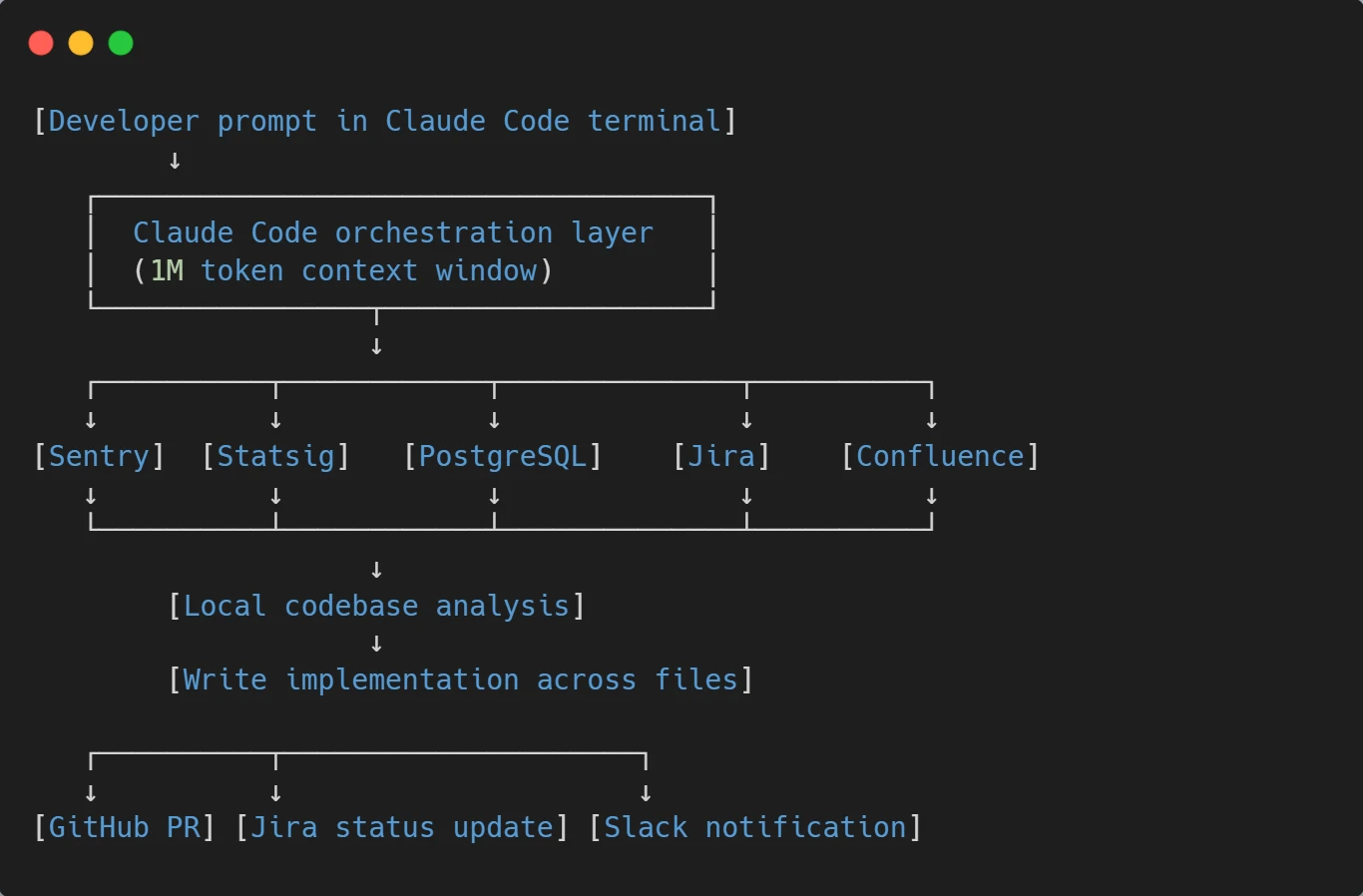
The detailed sequence:
- Claude queries Sentry for error rate data on the feature.
- Pulls Static data on adoption and feature flag status.
- Queries the PostgreSQL database (read-only) for affected user records.
- Reads the Jira ticket and acceptance criteria.
- Pulls related Confluence design docs if linked.
- Write the implementation across affected files.
- Creates a branch, commits, and opens a PR via GitHub MCP.
- Updates the Jira ticket status and adds a comment with the PR link.
- Posts to #engineering Slack with PR summary and reviewer tags.
This isn’t a hypothetical. It’s a documented MCP-enabled workflow running in production engineering teams right now. The developer’s role shifts from “executor of mechanical steps” to “architect and reviewer.” Time saved per workflow: 30–90 minutes typically. Compounded across a team of 10 engineers handling 50+ tickets per sprint, the productivity multiplier becomes significant.
Real Prompts Teams Are Using Daily
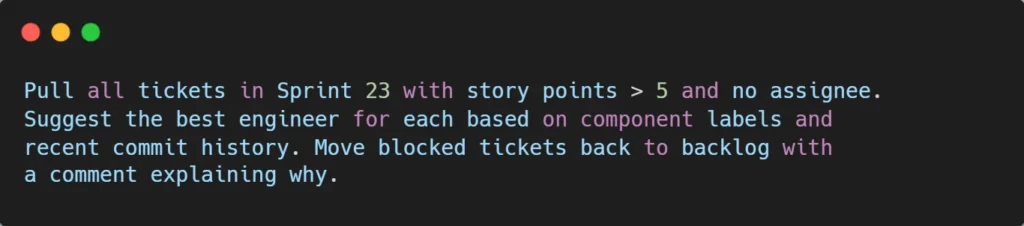
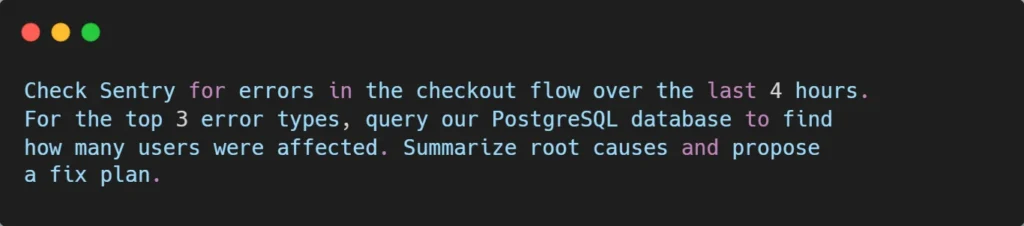
Here are working prompt patterns that engineering teams have adopted in 2026. Copy these as templates and adapt them to your stack:
a. Sprint planning automation:
b. Daily standup report:

c. Bug investigation from production data:
d. Code review preparation:

e. Feature flag verification:

Each of these prompts replaces 15–45 minutes of manual tool-switching with a single conversation. That’s the real productivity story of Claude Code as co-engineer , not “AI writes code faster” but “AI handles the coordination work that drains engineering hours.”
How This Compares to Other AI Coding Tools?
The honest competitive landscape in 2026:
GitHub Copilot is strongest as an in-IDE autocomplete and chat assistant. Tight GitHub integration for PR reviews and issue handling. But limited to multi-tool orchestration outside the GitHub ecosystem itself.
Cursor: Best daily editing experience with multi-model support and visual diff workflows. Solid MCP support, but workflow is centered on the editor, not the broader engineering toolchain.
Claude Code: Strongest at end-to-end workflows that span multiple tools. The 1M token context window and deep MCP integration make Claude Code as co-engineer practical for tasks no other tool handles cleanly.
The pattern most experienced developers settle into: Cursor or Copilot for daily editing + Claude Code for cross-tool workflows. The combined cost is around $40–60/month per seat, and the productivity gain is significantly larger than running either tool alone.
For teams evaluating the deeper differences between models powering these tools, the Claude Opus 4.7 vs GPT-5 comparison covers the model-level tradeoffs that affect agentic performance.
Setting Up Claude Code as Co-Engineer (Practical Steps)
For teams ready to deploy Claude Code as a real co-engineer, here’s the pragmatic setup order:
- Step 1: Start with Jira + GitHub. These two MCP integrations cover 60–70% of the value. Atlassian’s official server handles Jira (use API token authentication for stability; the older OAuth/SSE endpoint is being retired June 30, 2026). GitHub MCP runs via Anthropic’s connector directory.
- Step 2: Add Slack. This is what makes Claude Code feel like a real teammate. Status updates, notifications, and async coordination all happen here.
- Step 3: Configure database access carefully. PostgreSQL or MySQL MCP servers are powerful but require thoughtful permissions. Read-only by default. Production access requires explicit approval. Audit logging is non-negotiable.
- Step 4: Layer in specialized tools. Sentry, Figma, Confluence, and feature flag platforms get added based on what your team actually uses most. Don’t connect everything at once. Start with the tools that solve current pain points.
- Step 5: Configure at the project level. MCP servers can be configured globally (~/.claude/settings.json) or at the project level (.claude/settings.json). Project-level configuration means the team shares the same integrations important for consistent workflows.
- Step 6: Establish governance. Decide which actions require human approval (deploying code, deleting data, posting publicly). Decide which MCP servers are organization-approved versus experimental. Build audit logging into the deployment from day one.
This is the discipline that turns Claude Code into a system that drives real business growth rather than a tool that creates new compliance headaches.
The Honest Limitations
Claude Code as co-engineer, is powerful, but it’s not magic. The real limitations to plan for:
- Remote/SSH environments: Voice mode and some MCP features don’t work in remote environments where local resources aren’t accessible. If your team works through SSH bastions, plan around this.
- Permission complexity: MCP servers respect underlying tool permissions, which means misconfigured Jira projects or GitHub repos can leave Claude blind to things you expected it to see. Audit access carefully.
- Database write risks: As covered above, write access through agents creates real risk. Most production deployments keep databases read-only for AI agents.
- Rate limits: Heavy MCP usage can hit Jira, GitHub, or database API rate limits. Plan workflows accordingly, especially for batch operations.
- Token costs: Multi-tool workflows that touch 5–10 systems can burn a significant context window. Long sessions need management. This is where Claude Code’s 1M context window (vs competitors’ 200K) becomes a practical advantage.
- Not a replacement for code review: Claude Code as co-engineer accelerates the work but doesn’t eliminate the need for human judgment on production changes. Treat its output as a senior engineer’s pull request: high-quality, but worth reviewing.
Why This Matters for Engineering Leaders?
If you’re running an engineering team in 2026, the strategic decision isn’t “should we use AI coding tools?” That’s settled. The decision is whether to deploy AI as a copilot or as a co-engineer.
The copilot path keeps things familiar. Developers use AI for autocomplete and chat. Productivity improves 20–30%. The organizational model stays the same.
The co-engineer path is harder but more transformative. It requires connecting Claude Code to your engineering stack via MCP, establishing governance, training the team on new workflows, and rethinking how engineering work gets coordinated. Done well, the productivity multiplier is 2–3x rather than 20–30%. Done poorly, you create new risks without capturing new value.
The pattern matches what we documented in our analysis of why AI projects fail: tools alone don’t drive results. Workflow redesign does. Claude Code as co-engineer, rewards teams willing to redesign how engineering work flows across tools.
Conclusion: The Co-Engineer Era Has Started
Most AI coding tools are still copilots, useful, incremental, fundamentally assistive. Claude Code with MCP integration is something different: an AI that participates in engineering work end-to-end, from Jira ticket to deployment notification, across every tool your team already uses.
The teams that adopt Claude Code as co-engineer in 2026 aren’t just shipping code faster. They’re operating with fundamentally different leverage, handling more tickets per engineer, coordinating across more tools with less context-switching, and freeing senior engineers to focus on architecture and judgment rather than coordination overhead.
Copilots help individual developers type less. Co-engineers help entire teams build more. That distinction is what separates the productivity gain of 2024 from the operational shift of 2026.
About Orbilon Technologies
Orbilon Technologies is an AI development partner that helps engineering teams deploy Claude Code as a real co-engineer, including MCP server setup, custom integrations for internal tools, governance frameworks, and workflow design across Jira, GitHub, Slack, databases, and the rest of your engineering stack.
Our team holds a 4.96 average rating across Clutch, GoodFirms, and Google from clients across the US, Europe, and the Middle East, including SaaS startups, financial services firms, healthcare platforms, and enterprise operations teams.
Ready to turn Claude Code into a real co-engineer for your team? Get a free consultation, we’ll review your current toolchain and give you an honest MCP integration roadmap.
- Email: support@orbilontech.com
Want to Hire Us?
Are you ready to turn your ideas into a reality? Hire Orbilon Technologies today and start working right away with qualified resources. We will take care of everything from design, development, security, quality assurance, and deployment. We are just a click away.