Claude Code as Co-Engineer: Why It's More Than a Copilot in 2026
Introduction
Most AI coding tools in 2026 are still copilots; they sit beside you, suggest completions, and answer questions when asked. They’re useful, but they’re fundamentally assistants. They don’t open Jira tickets. They don’t query your production database. They don’t post status updates to Slack. They don’t read the Confluence design doc before they start coding.
Claude Code is becoming something different. With Model Context Protocol (MCP) integrations now production-ready across Jira, Slack, GitHub, PostgreSQL, Confluence, Sentry, Figma, and dozens of other tools, Claude Code as co-engineer, is the closest thing the industry has to an actual teammate that handles end-to-end engineering work, not just code suggestions.
This shift matters because it changes what AI can actually do for your team. A copilot makes individual developers ~30% faster. A co-engineer changes how an entire engineering org operates, handling tickets, pulling requirements, querying data, writing implementations, and reporting back without humans copy-pasting between tools.
Here’s how Claude Code as co-engineer, actually works in 2026, what it connects to, and why teams adopting it now are reporting different results than teams still treating AI as a glorified autocomplete.
The Copilot vs Co-Engineer Distinction (And Why It Matters)
Before the details, the difference between these two models is worth understanding clearly. Most teams confuse them, and that confusion is exactly why so many AI coding deployments underdeliver.
| Capability | AI Copilot | Claude Code as Co-Engineer |
|---|---|---|
| Suggests code completions | ✅ Yes | ✅ Yes |
| Answers questions in chat | ✅ Yes | ✅ Yes |
| Reads Jira ticket requirements | ❌ No | ✅ Yes |
| Queries the production database | ❌ No | ✅ Yes (read-only recommended) |
| Posts to Slack channels | ❌ No | ✅ Yes |
| Creates GitHub PRs autonomously | ⚠️ Limited | ✅ Yes |
| Pulls Figma designs | ❌ No | ✅ Yes |
| Checks Sentry error logs | ❌ No | ✅ Yes |
| Updates Jira ticket status | ❌ No | ✅ Yes |
| Reacts to webhook events | ❌ No | ✅ Yes |
| Coordinates multi-system workflows | ❌ No | ✅ Yes |
A copilot saves keystrokes. A co-engineer saves entire workflows. That’s the gap MCP closes, and it’s why “Claude Code as co-engineer” isn’t marketing language. It’s a structural change in what AI can do inside an engineering org.
What MCP Actually Is (In Plain Terms)?
Model Context Protocol (MCP) is an open standard released by Anthropic to let AI models connect to external systems through a single, consistent interface. Instead of writing custom integrations for every tool (one for Jira, one for Slack, one for your database, one for GitHub), you install or configure MCP servers as small bridges that expose each tool’s capabilities to Claude Code in a standardized way.
The practical effect: once you connect Claude Code to your engineering stack via MCP, it can take real actions across all of those tools as part of a single conversation. You don’t switch tabs. You don’t paste ticket descriptions into your terminal. You don’t copy database query results into Slack manually. Claude Code reads, writes, and coordinates across systems on your behalf.
This is why the Claude Code vs GitHub Copilot vs Cursor comparison increasingly favors Claude Code for teams doing real engineering work, not because the autocomplete is better (it’s not always), but because the depth of integration is fundamentally different.
What MCP Configuration Actually Looks Like?
Here’s a real .claude/settings.json showing how Claude Code connects to multiple tools at once. This goes in your project root and gets shared across the team:
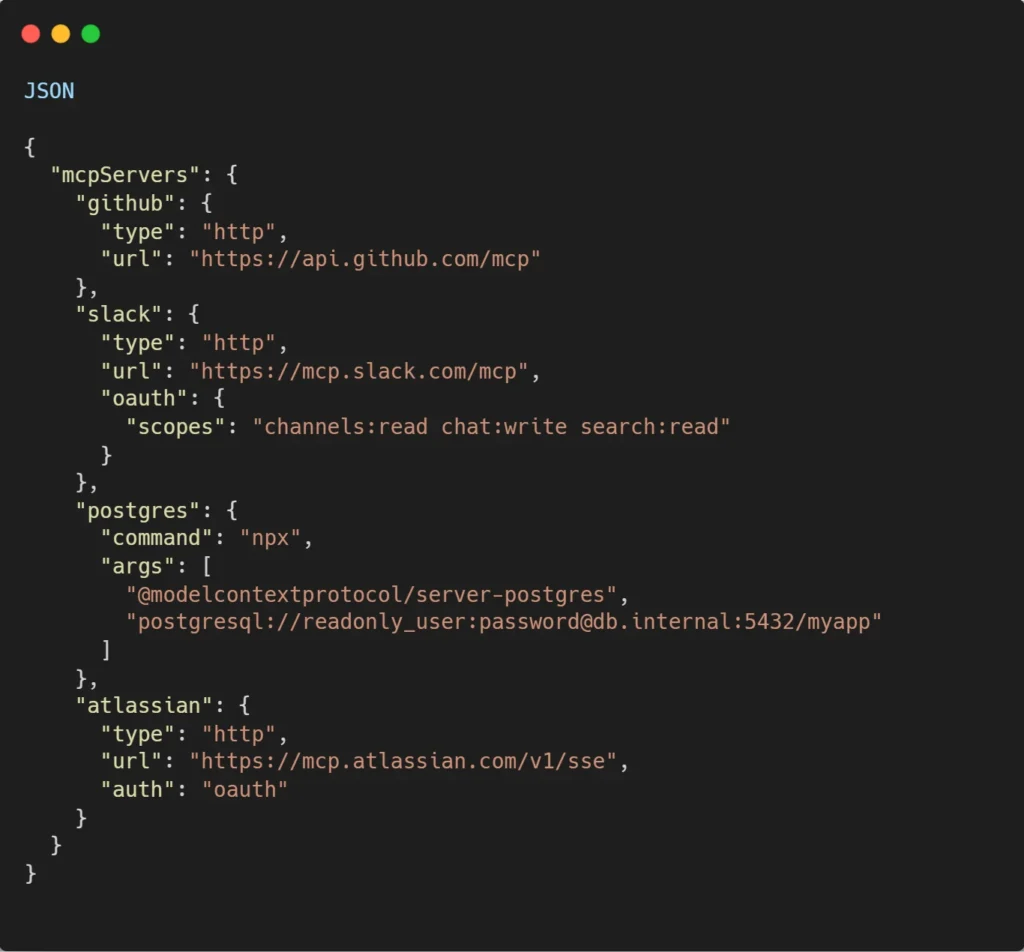
Three things matter here for production deployment: the PostgreSQL URL uses a readonly_user account (write access for AI agents creates real risk), Slack scopes are pinned to the minimum needed (channels: read chat: write search: read not full workspace access), and the Atlassian connector uses OAuth. Hence, each team member authenticates with their own permissions.
Adding a new MCP server later is one command from the terminal:

The Core Connections That Make Claude Code as Co-Engineer Real
Five integrations move Claude Code from “smart autocomplete” to “actual teammate.” Here’s what each one unlocks.
1. Jira (via Atlassian's Official MCP Server)
Atlassian’s remote MCP server went GA in February 2026 with Anthropic as its first official partner. This integration is the single biggest unlock for Claude Code as co-engineer, because Jira is where engineering work is actually defined.
What this means in practice:
- Claude reads ticket requirements before writing code.
- Pulls acceptance criteria and reproduces bugs based on ticket details.
- Creates new issues with proper field population (summary, description, priority, story points, labels, components).
- Updates ticket status as work progresses.
- Adds comments with implementation notes for reviewers.
- Searches issues using natural language (“show me my in-progress tickets in project ENG”).
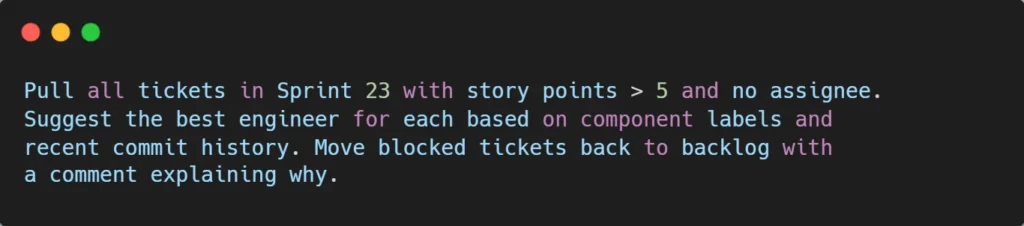
- Handles sprint planning automation, moving blocked tickets, generating standup reports, and assigning work.
The workflow that changes everything: “Add the feature described in JIRA issue ENG-4521 and create a PR on GitHub.” That’s one sentence. Claude reads the ticket, understands the requirements, writes the implementation, creates the PR, and updates the issue status without the developer switching tools.
For organizations using Atlassian’s enterprise stack, the MCP server respects existing Atlassian permissions, so Claude only sees what the authenticated user can see. Restricted projects stay restricted.
2. GitHub (Repository, PRs, Issues)
GitHub MCP integration is where Claude Code as co-engineer, lives every day. The capabilities go well beyond reading repository contents:
- Review pull requests with actual context (Jira ticket + design doc + code changes together).
- Check commit histories to understand why specific code exists.
- Create branches, commits, and PRs autonomously.
- Read open issues and prioritize them based on labels and assignees.
- Cross-reference PRs with related Jira tickets.
- Run security scans and dependency reviews.
The workflows that matter most: pulling open issues, prioritizing based on team capacity, implementing fixes, opening PRs with proper descriptions linking back to Jira, and notifying reviewers via Slack. That entire chain of five tools, dozens of clicks, collapses into one conversation.
3. Slack (Communication & Status Updates)
Slack MCP integration is what makes Claude Code feel like a real teammate.
The agent can:
- Post status updates to channels (“Deploy v2.3 is live with rollback plan attached”).
- Read channel context to understand ongoing conversations and design decisions.
- React to webhook events while you’re away.
- Coordinate with other team members through @mentions.
- Pull relevant Slack discussions into the coding context.
The integration also goes the other way: MCP servers can act as channels that push messages into your Claude Code session. The agent reacts to Telegram messages, Discord chats, or webhook events, even when you’re not actively typing.
4. Databases (PostgreSQL, MySQL, Read-Only Recommended)
This is where Claude Code as co-engineer earns its keep on data-heavy work. Direct database connections let the agent:
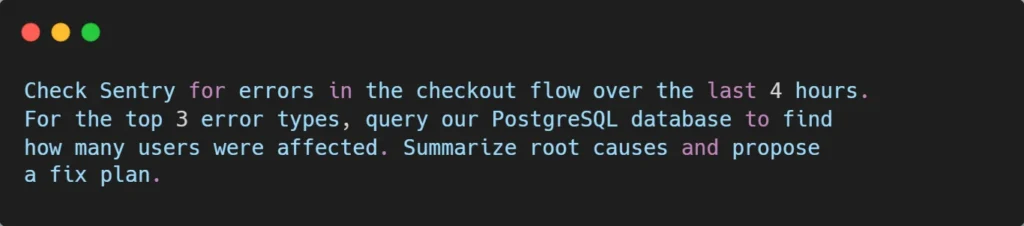
- Query production data to debug user-reported issues.
- Find affected records before deploying fixes.
- Analyze schema before suggesting migrations.
- Generate sample data for testing.
- Identify performance issues by examining indexes and query patterns.
Critical security note: Always use read-only database connections in production. MCP servers have access to external services. Only install servers you trust, and configure them with the narrowest permissions that get the job done. Database write access through AI agents requires careful governance.
This is exactly the pattern we covered in our analysis of why AI projects fail capability without governance creates more problems than it solves.
5. Design, Monitoring, and Specialized Tools
The full ecosystem extends well beyond the core four:
- Figma: Pull design specs directly into coding context.
- Sentry: Check error rates and stack traces for features in production.
- Statsig / LaunchDarkly: Verify feature flag rollouts and A/B test results.
- Confluence: Read design docs and architecture decisions before implementing.
- Compass: Find service owners and dependencies during incident response.
- Linear: Alternative to Jira with similar MCP support.
- Gmail: Draft emails inviting users to feedback sessions.
- PagerDuty: Acknowledge alerts and pull incident context.
Each of these turns a manual context-gathering step into an automated one. The cumulative effect is what teams describe as “feeling like Claude Code knows my codebase, my team, and my workflow” because it actually does, through MCP.
A Real Co-Engineer Workflow (Start to Finish)
Here’s what a single Claude Code session can do in 2026 with full MCP integration, something no copilot can match:
Prompt: “Check Sentry and Statsig to understand the usage and error rate of the feature in ENG-4521. Find the 10 most recent users who hit the error in our PostgreSQL database. Implement the fix, create a PR on GitHub, update the Jira ticket with implementation notes, and post to #engineering when the PR is ready for review.”
What happens behind the scenes:
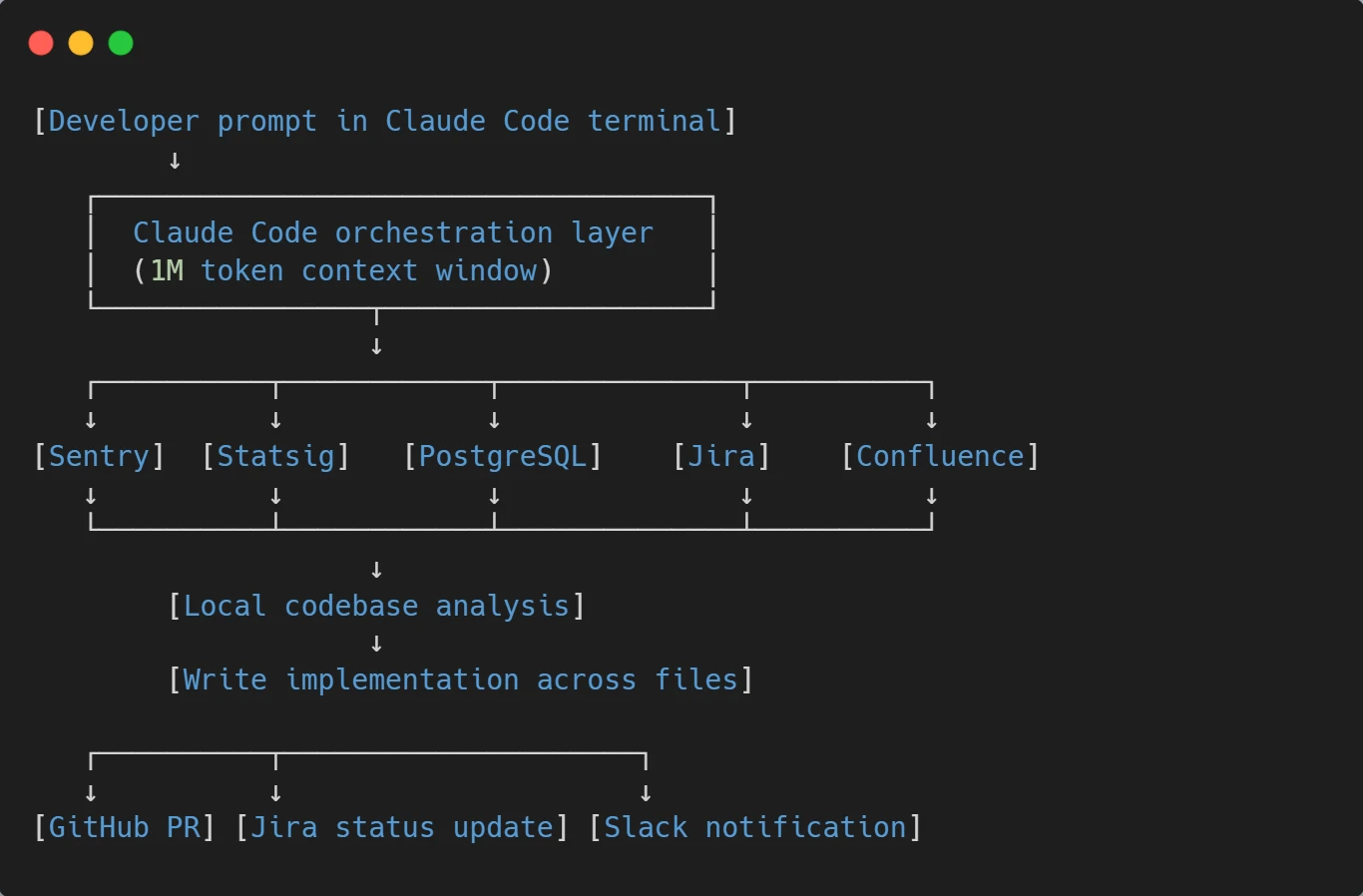
The detailed sequence:
- Claude queries Sentry for error rate data on the feature.
- Pulls Static data on adoption and feature flag status.
- Queries the PostgreSQL database (read-only) for affected user records.
- Reads the Jira ticket and acceptance criteria.
- Pulls related Confluence design docs if linked.
- Write the implementation across affected files.
- Creates a branch, commits, and opens a PR via GitHub MCP.
- Updates the Jira ticket status and adds a comment with the PR link.
- Posts to #engineering Slack with PR summary and reviewer tags.
This isn’t a hypothetical. It’s a documented MCP-enabled workflow running in production engineering teams right now. The developer’s role shifts from “executor of mechanical steps” to “architect and reviewer.” Time saved per workflow: 30–90 minutes typically. Compounded across a team of 10 engineers handling 50+ tickets per sprint, the productivity multiplier becomes significant.
Real Prompts Teams Are Using Daily
Here are working prompt patterns that engineering teams have adopted in 2026. Copy these as templates and adapt them to your stack:
a. Sprint planning automation:
b. Daily standup report:

c. Bug investigation from production data:
d. Code review preparation:

e. Feature flag verification:

Each of these prompts replaces 15–45 minutes of manual tool-switching with a single conversation. That’s the real productivity story of Claude Code as co-engineer , not “AI writes code faster” but “AI handles the coordination work that drains engineering hours.”
How This Compares to Other AI Coding Tools?
The honest competitive landscape in 2026:
GitHub Copilot is strongest as an in-IDE autocomplete and chat assistant. Tight GitHub integration for PR reviews and issue handling. But limited to multi-tool orchestration outside the GitHub ecosystem itself.
Cursor: Best daily editing experience with multi-model support and visual diff workflows. Solid MCP support, but workflow is centered on the editor, not the broader engineering toolchain.
Claude Code: Strongest at end-to-end workflows that span multiple tools. The 1M token context window and deep MCP integration make Claude Code as co-engineer practical for tasks no other tool handles cleanly.
The pattern most experienced developers settle into: Cursor or Copilot for daily editing + Claude Code for cross-tool workflows. The combined cost is around $40–60/month per seat, and the productivity gain is significantly larger than running either tool alone.
For teams evaluating the deeper differences between models powering these tools, the Claude Opus 4.7 vs GPT-5 comparison covers the model-level tradeoffs that affect agentic performance.
Setting Up Claude Code as Co-Engineer (Practical Steps)
For teams ready to deploy Claude Code as a real co-engineer, here’s the pragmatic setup order:
- Step 1: Start with Jira + GitHub. These two MCP integrations cover 60–70% of the value. Atlassian’s official server handles Jira (use API token authentication for stability; the older OAuth/SSE endpoint is being retired June 30, 2026). GitHub MCP runs via Anthropic’s connector directory.
- Step 2: Add Slack. This is what makes Claude Code feel like a real teammate. Status updates, notifications, and async coordination all happen here.
- Step 3: Configure database access carefully. PostgreSQL or MySQL MCP servers are powerful but require thoughtful permissions. Read-only by default. Production access requires explicit approval. Audit logging is non-negotiable.
- Step 4: Layer in specialized tools. Sentry, Figma, Confluence, and feature flag platforms get added based on what your team actually uses most. Don’t connect everything at once. Start with the tools that solve current pain points.
- Step 5: Configure at the project level. MCP servers can be configured globally (~/.claude/settings.json) or at the project level (.claude/settings.json). Project-level configuration means the team shares the same integrations important for consistent workflows.
- Step 6: Establish governance. Decide which actions require human approval (deploying code, deleting data, posting publicly). Decide which MCP servers are organization-approved versus experimental. Build audit logging into the deployment from day one.
This is the discipline that turns Claude Code into a system that drives real business growth rather than a tool that creates new compliance headaches.
The Honest Limitations
Claude Code as co-engineer, is powerful, but it’s not magic. The real limitations to plan for:
- Remote/SSH environments: Voice mode and some MCP features don’t work in remote environments where local resources aren’t accessible. If your team works through SSH bastions, plan around this.
- Permission complexity: MCP servers respect underlying tool permissions, which means misconfigured Jira projects or GitHub repos can leave Claude blind to things you expected it to see. Audit access carefully.
- Database write risks: As covered above, write access through agents creates real risk. Most production deployments keep databases read-only for AI agents.
- Rate limits: Heavy MCP usage can hit Jira, GitHub, or database API rate limits. Plan workflows accordingly, especially for batch operations.
- Token costs: Multi-tool workflows that touch 5–10 systems can burn a significant context window. Long sessions need management. This is where Claude Code’s 1M context window (vs competitors’ 200K) becomes a practical advantage.
- Not a replacement for code review: Claude Code as co-engineer accelerates the work but doesn’t eliminate the need for human judgment on production changes. Treat its output as a senior engineer’s pull request: high-quality, but worth reviewing.
Why This Matters for Engineering Leaders?
If you’re running an engineering team in 2026, the strategic decision isn’t “should we use AI coding tools?” That’s settled. The decision is whether to deploy AI as a copilot or as a co-engineer.
The copilot path keeps things familiar. Developers use AI for autocomplete and chat. Productivity improves 20–30%. The organizational model stays the same.
The co-engineer path is harder but more transformative. It requires connecting Claude Code to your engineering stack via MCP, establishing governance, training the team on new workflows, and rethinking how engineering work gets coordinated. Done well, the productivity multiplier is 2–3x rather than 20–30%. Done poorly, you create new risks without capturing new value.
The pattern matches what we documented in our analysis of why AI projects fail: tools alone don’t drive results. Workflow redesign does. Claude Code as co-engineer, rewards teams willing to redesign how engineering work flows across tools.
Conclusion: The Co-Engineer Era Has Started
Most AI coding tools are still copilots, useful, incremental, fundamentally assistive. Claude Code with MCP integration is something different: an AI that participates in engineering work end-to-end, from Jira ticket to deployment notification, across every tool your team already uses.
The teams that adopt Claude Code as co-engineer in 2026 aren’t just shipping code faster. They’re operating with fundamentally different leverage, handling more tickets per engineer, coordinating across more tools with less context-switching, and freeing senior engineers to focus on architecture and judgment rather than coordination overhead.
Copilots help individual developers type less. Co-engineers help entire teams build more. That distinction is what separates the productivity gain of 2024 from the operational shift of 2026.
About Orbilon Technologies
Orbilon Technologies is an AI development partner that helps engineering teams deploy Claude Code as a real co-engineer, including MCP server setup, custom integrations for internal tools, governance frameworks, and workflow design across Jira, GitHub, Slack, databases, and the rest of your engineering stack.
Our team holds a 5.0 average rating across Clutch, GoodFirms, and Google from clients across the US, Europe, and the Middle East, including SaaS startups, financial services firms, healthcare platforms, and enterprise operations teams.
Ready to turn Claude Code into a real co-engineer for your team? Get a free consultation, we’ll review your current toolchain and give you an honest MCP integration roadmap.
- Email: support@orbilontech.com
Want to Hire Us?
Are you ready to turn your ideas into a reality? Hire Orbilon Technologies today and start working with qualified resources right away. We will take care of everything, from design and development to security, quality assurance, and deployment. We are just a click away.