
How to Automate Your Front Desk With AI in 2026 (Without Losing the Human Touch)
Introduction
Here’s a number that should keep every business owner up at night: 62% of calls to small businesses go unanswered. And 85% of those callers never call back — they call your competitor instead.
If your average customer is worth $400 and you miss just 4 calls per day at a 30% close rate, that’s $120,000 per year walking out the door because nobody picked up the phone.
The old way — hiring a full-time receptionist at $35,000–$50,000/year plus benefits, or paying a live answering service $400–$800/month for limited minutes — was already expensive. In 2026, the math has completely changed. You can now automate your front desk with AI for $49–$299 per month, answer 100% of calls 24/7/365, book appointments directly into your calendar, and route emergencies to your cell — all while sounding so natural that callers often can’t tell they’re speaking with AI.
This guide covers why the old way is costing you more than you think, how to automate your front desk with AI without losing the personal touch your customers expect, and which solutions actually work in 2026.
The Hidden Cost of Your Current Front Desk
| Cost Factor | What You’re Actually Paying |
|---|---|
| Full-time receptionist salary | $35,000–$50,000/year |
| Benefits, payroll taxes, overhead | +$10,000–$15,000/year |
| Training and turnover costs | $3,000–$5,000 per hire |
| Sick days, vacation, breaks | 30–40 days of no coverage/year |
| Missed calls during busy periods | $450 per missed call (average) |
| After-hours missed revenue | $42,000/year in preventable losses |
| Total real cost | $90,000–$150,000/year |
What "Automate Your Front Desk With AI" Actually Means in 2026?
Let’s clear up what AI front desk automation is — and what it isn’t.
It is: A virtual AI receptionist that answers every inbound call using natural language conversation (not robotic phone trees), understands why callers are calling, takes action — books appointments, answers FAQs, captures lead information, routes emergencies, and works 24/7 without breaks, benefits, or bad days.
It isn’t: A voicemail system with a friendly greeting. It isn’t an IVR menu that says “press 1 for sales, press 2 for support.” It isn’t a chatbot that only works on your website. And critically, it isn’t a system that replaces every human interaction — it handles the 70–80% of routine calls so your team can focus on the 20–30% that genuinely need a human touch.
Modern AI receptionists in 2026 can handle conversations that would have required a trained human just two years ago. They detect caller intent, ask qualifying questions, answer complex FAQs by referencing your website and uploaded documents, schedule appointments directly in your calendar, send follow-up texts with booking confirmations, update your CRM, and escalate urgent calls to your cell phone — all in a single natural conversation.
RingCentral’s AI Receptionist (AIR) now serves over 8,300 customers, growing 44% quarter-over-quarter — signaling massive demand from businesses of all sizes looking to automate their front desk with AI.
AI Front Desk vs. Human Receptionist vs. Live Answering Service
| Capability | Human Receptionist | Live Answering Service | AI Front Desk |
|---|---|---|---|
| Monthly cost | $2,900–$5,000 | $300–$800 | $49–$299 |
| Availability | 8–10 hrs/day, weekdays | Business hours (limited) | 24/7/365 |
| Concurrent calls | 1 at a time | 2–5, depending on staffing | Unlimited |
| After-hours coverage | ❌ None | ⚠️ Extra cost | ✅ Included |
| Appointment booking | ✅ Manual | ⚠️ Basic | ✅ Automated + calendar sync |
| CRM integration | ⚠️ Manual entry | ❌ Usually not | ✅ Salesforce, HubSpot, Zoho |
| FAQ handling | ✅ Great | ⚠️ Script-based | ✅ Trained on your content |
| Empathy/complex situations | ✅ Excellent | ✅ Good | ⚠️ Improving (escalates to human) |
| Consistency | ⚠️ Varies by mood/day | ⚠️ Varies by agent | ✅ 100% consistent |
| Scale during peak times | ❌ Overwhelmed | ⚠️ Extra charges | ✅ Handles 10 or 1,000 calls |
| Annual cost | $35,000–$60,000 | $3,600–$9,600 | $588–$3,588 |
| Cost savings vs. human | — | 80–90% | 93–98% |
The gap is no longer close. When you automate your front desk with AI, you get 24/7 coverage, unlimited concurrent calls, CRM integration, and appointment booking at 93–98% less than a human receptionist — with the option to escalate to a real person whenever the situation requires it.
How to Automate Your Front Desk With AI: 5-Step Implementation
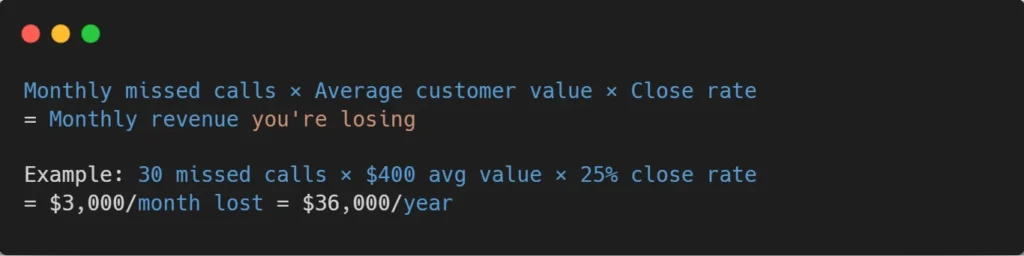
Step 1: Calculate Your Missed Call Revenue (10 minutes)
Before choosing a tool, know your numbers. Use this formula:
Step 2: Choose Your AI Receptionist Platform (30 minutes)
The 2026 market is really established now. Here are the top choices based on the kind of business you have:
- For businesses that want to save money, AIRA is a good option because it costs $24.95 per month for 30 calls, or you could go with Dialzara for $29 per month for 60 minutes. These are choices for small businesses because they offer basic AI reception services for a price that is lower than what you would pay for a business lunch.
- For businesses that are getting bigger: My AI Front Desk is a choice because it costs $99 per month for 200 minutes, or you could go with Rosie AI for $49 per month. My AI Front Desk and Rosie AI offer features like booking appointments, handling calls after hours, and basic integration with customer relationship management tools.
- For companies that want to replace their desk completely, RingCentral AI Receptionist and GoTo Connect AI are good options because they offer advanced virtual reception services with unlimited calls, deep integration with customer relationship management tools like Salesforce, HubSpot, and Zoho call analytics, and support for multiple locations.
- For healthcare and clinics: OmniMD is a choice because it offers AI front desk automation that meets HIPAA requirements and can handle over 60 tasks, including checking insurance, scheduling appointments, and filling out patient intake forms.
Step 3: Train the AI on Your Business (1–2 hours)
This is where the “human touch” comes in. You’re not just turning on a generic robot — you’re training it to represent your specific business:
- Paste your website URL — the AI crawls and learns your services, pricing, hours, and policies.
- Upload FAQs — common questions callers ask, with your preferred answers in your tone.
- Set qualifying questions — what information should the AI collect from new callers? Name, service needed, timeline, budget?
- Define routing rules — emergencies go to your cell. Appointments get booked automatically. Sales inquiries get a follow-up text with your calendar link.
- Customize voice and tone — choose a voice that matches your brand. Professional and warm for a law firm. Friendly and casual for a salon. Authoritative for a medical practice.
Step 4: Set Up Integrations (30 minutes)
You should connect the AI receptionist to the tools you already use so that the AI receptionist can help you, and nothing gets missed.
- The AI receptionist can work with your calendar, like Google Calendar, Outlook, or Calendly, to book appointments at the time.
- The AI receptionist can also work with your CRM, like Salesforce, HubSpot, or Zoho, to automatically capture leads and log what is happening with them.
- The AI receptionist can send messages, like SMS or WhatsApp, to confirm bookings and follow up with people.
- It can also work with Slack or Teams to let you know when you get a high-priority call.
- If you do not use a CRM, the AI receptionist can even work with Google Sheets to keep a record of your calls so you can see what the AI receptionist is doing with the AI receptionist.
Step 5: Test, Launch, and Monitor (Ongoing)
Why not have your own AI receptionist? Throw in a bunch of crazy test cases, such as an angry person, a confused person, or a person who asks an unusual question. Then, use what you hear to continue to strengthen the training. Next time, launch carefully first, the after-hours calls, then the overflow during busy periods, and finally, the full-time coverage.
For the first month, checking the call transcripts on a weekly basis is a good idea. Try to find the conversations where the AI was challenged and include the training data to solve those scenarios. Most businesses reach a call satisfaction level of 90%+ within 23 weeks from the moment they start tuning.
Keeping the Human Touch: The Hybrid Approach
The best implementations in 2026 don’t eliminate humans — they create a hybrid model where AI handles routine interactions, and humans handle relationships:
- AI handles (70–80% of calls): Appointment booking, FAQ answers, business hours/location inquiries, lead qualification, after-hours messages, call routing, follow-up text/email sending.
- Humans handle (20–30% of calls): Upset customers, complex service questions, high-value sales conversations, sensitive situations (medical emergencies, legal crises), VIP client relationships, negotiations, and custom quotes.
The key insight: when you automate your front desk with AI for the routine 80%, your team actually delivers better human interactions on the calls that matter — because they’re not exhausted from answering “what are your hours?” for the 40th time today.
The ROI: Real Numbers From Real Businesses
The data from production deployments in 2026 tells a compelling story:
- 300% first-year ROI through 25% increase in bookings from captured missed calls.
- $250,000 savings over 5 years, including salary, training, and overhead elimination.
- 49:1 ROI for a $60/month AI receptionist capturing half of previously missed calls.
- 93% of voicemail callers never call back — AI eliminates voicemail.
- $42,000/year in preventable revenue loss recovered by answering 100% of calls.
The question every business owner should ask isn’t “can I afford an AI receptionist?” It’s “Can I afford to keep losing $42,000+ per year to missed calls while paying $50,000+ for a receptionist who only works 8 hours a day?”
Conclusion: The Old Way Is the Expensive Way
Traditionally operating a front desk, one lone receptionist working 8 hours, having lunch breaks, calling in sick, going on vacation, getting overwhelmed during peak times, and sending all after-hours calls to voicemail is actually the priciest version available in 2026. In fact, you are paying more for less coverage, losing potential money-making calls daily, and your hardest-working employees end up spending countless hours on telephone communications instead of focusing on more valuable tasks.
If you choose to automate your front desk with AI, it doesn’t mean you get rid of the human element; rather, you give it a different direction. Your AI will be responsible for handling the 80% of calls, which are straightforward, repetitive, and predictable. Your staff, on the other hand, will manage the 20% calls that require emotions, thinking outside the box, and relationship establishment.
Hence, every call is attended to. Every lead is grabbed. Every booking is made. Not to mention that your yearly expenditure will reduce from $50,000+ to less than $3,000. The tools are available, affordable, and effective. The only thing you need to think about is how many more calls and how much more income you are willing to lose before you switch.
About Orbilon Technologies
Orbilon Technologies is an AI development agency that builds intelligent front desk and customer communication systems — including custom AI receptionists, voice agent integrations, and automated appointment booking workflows. With years of engineering experience and a 4.96 average rating across Clutch, GoodFirms, and Google, we help businesses deploy AI front desk solutions that capture every call and every lead.
Ready to automate your front desk with AI? Get a free consultation from our AI automation team.
- Website:orbilontech.com
- Email: support@orbilontech.com
Want to Hire Us?
Are you ready to turn your ideas into a reality? Hire Orbilon Technologies today and start working right away with qualified resources. We will take care of everything from design, development, security, quality assurance, and deployment. We are just a click away.