n8n vs Zapier vs Make: Which Automation Platform Is Right for B2B Companies Building AI Workflows in 2026?
Introduction
If your business is focused on selling to other businesses and you want to make your processes automatic or create AI-driven workflows, most probably you have seen the names of three products multiple times – n8n, Zapier, and Make (formerly Integromat). All of them commit to helping you save hours, decrease human involvement, and merge your systems. However, they are totally different in how they work, and if you choose the wrong one, it can lead to a long and difficult migration process several months later.
Here, we compare the major aspects that make the difference in reality – price levels, AI features, typical scenario usages, and approaches to implementation – allowing you to determine what tool would be best for your group without doubting yourself later.
Quick Overview: What Each Platform Actually Does
Before we dig deeper, here’s the short version:
Zapier is the no-code king. It has 8,000+ integrations, the simplest interface, and is built for non-technical teams who want fast results. It’s the most expensive at scale.
Make sits in the middle. It offers a powerful visual workflow builder with branching logic, routers, and data transformers — all at roughly 60% less than Zapier. It works well for teams that have outgrown Zapier but don’t need full developer control.
n8n is the open-source, developer-first platform. You can self-host it, write custom JavaScript or Python at any step, and connect to any API. It’s the cheapest option at scale and the most capable for AI workflows — but it requires technical expertise.
n8n vs Zapier vs Make: Feature-by-Feature Breakdown
1. Integrations
Zapier opens strong – more than eight thousand ready-made links between apps sit waiting. When your software stack includes rare or specialized platforms, there’s a solid chance Zapier already speaks their language.
Meanwhile, Make steps in with one and a half to two thousand built-in ties, yet digs deeper into each tool’s inner workings.
On another path entirely, n8n brings over a thousand core building blocks, though it sidesteps limits by adding an HTTP Request option that can reach any online service with an open API.
Bottom line: Breadth? Zapier grabs that crown without breaking a sweat. When it comes to deep control and room to bend tools how you need, n8n steps ahead, quiet but sure.
2. AI Workflow Capabilities
This is where things get interesting for B2B companies in 2026. All three now support OpenAI, Anthropic Claude, and Google Gemini connections. But the depth varies significantly.
n8n ships 70+ AI-specific nodes covering LLMs, embeddings, vector databases, speech recognition, OCR, and image generation. It natively supports LangChain, self-hosted LLMs, retrieval-augmented generation (RAG), and multi-agent orchestration. If you’re building autonomous AI agents or internal AI systems, n8n is purpose-built for this.
Zapier launched AI Agents and Zapier Copilot for natural language workflow creation, plus 450+ AI-focused integrations. It’s the fastest way to add simple AI steps without writing code, but it lacks native agent architecture for complex reasoning chains.
Make offers an AI agent builder (currently in beta) and basic LLM connections. It’s improving, but still lags behind n8n for advanced AI use cases.
3. Pricing That Actually Matters
Pricing models vary greatly, which changes the overall expense when you scale up:
Zapier bills per task – every individual step is counted. So, a 5-step workflow running 1,000 times is equal to 5,000 tasks. Professional plan costs $19.99/month for 750 tasks. It is very easy for costs to get out of control.
Make bills per operation, but bundle steps more intelligently. Core plan comes with 10,000 operations for $10.59/month, which is about 13x more operations than Zapier for the same price.
The entire workflow run counts as one execution, irrespective of how many nodes it contains for n8n charging. 20-node workflow running 1,000 times = 1,000 executions. Self-hosted n8n is absolutely free (you only pay for your server). Cloud plans start at $20/month.
Example: A complex workflow with 8 steps and 10,000 runs/month might cost $250 to 400+/month on Zapier, $29/month on Make, or $10 to 15/month self-hosted on n8n.
4. Self-Hosting & Data Privacy
Only n8n provides self-hosting, whereas Zapier and Make are cloud-only SaaS platforms. This can be a major sticking point for B2B companies in regulated industries, e.g., healthcare finance, legal, government, or those with strict data residency requirements, who often cannot compromise on these. By self-hosting n8n, your data stays within your own infrastructure at all times. You are in charge of encryption access updates and compliance without any external involvement.
Real Use Cases by Industry
- SaaS Companies: Starting fresh each time, one system ties customer records to help requests automatically. Personal messages go out when people use certain features, triggered by their actions. To guess who might stop using the service, smart sequences learn from behavior patterns. When steps pile up and get tangled, a tool like n8n handles the load smoothly. Simpler routines, especially in outreach campaigns, run more easily on Zapier instead
- E-Commerce & Retail: Staying on top of stock levels works smoothly when data flows between systems without delays. Orders move forward by themselves once rules are set up ahead of time. Product details come together fast using smart tools that write them automatically. Support chats run more easily with bots trained to answer common questions. Visual setups guide your workflow if handling sales from multiple places matters. Custom links to delivery services take shape clearly when flexibility counts most
- Healthcare & FinTech: Using n8n lets clinics send alerts while sticking to HIPAA standards, turn paper forms into digital records through scanning tech, then move those files into internal AI workflows for checking insurance claims. Because the system runs on private servers, information stays inside secure networks – this makes compliance easier without relying on outside providers
- Marketing Agencies: Start by grabbing leads automatically. Then slide them straight into your CRM. From there, emails go out one after another without stopping. Artificial intelligence helps write what needs to be sent. Posts on social platforms line up ahead of time. Reports come together with little effort. For fast connections between tools, Zapier has plenty to choose from. When tasks grow messy, make costs less to keep running
- Logistics & Operations: Shipping alerts happen on their own. Warehouse details stay current without manual checks. Machines get serviced when patterns suggest a need, not after they fail. Old software links to new tools using tailored connections. Code runs where needed because the system allows it. Even unusual workflows find a place here, something others struggle to offer.
How to Implement: Step-by-Step Process
Step 1: Audit Your Current Workflows – Identify manual processes that are repetitive in your business and quantify each of them based on how much time, effort, and money they take. For each process, identify the tools and systems involved, the triggering events, and the actions performed. Prioritize processes by the amount of time saved and error reduction potential.
Step 2: Assess Your Team’s Technical Capacity – This is where you need to be really candid. For example, if your team has programmers who are very comfortable with APIs and JavaScript, then using n8n will help you get maximum value. On the other hand, if your team is mostly non-technical, Zapier is the solution that will give you results the fastest. It is kind of a sweet spot for teams that have some technical skills.
Step 3: Start with One High-Impact Workflow – You don’t have to automate everything in one day. Just focus on one workflow that happens frequently and shows tangible ROI; for example, lead routing, invoice processing, or customer onboarding.
Step 4: Build Test Monitor – Create your first automation, activate its test mode, check for the correct result, and then roll out to production. All three platforms indeed provide the possibility of running tests. Keep an eye on execution log entries for the errors and make improvements.
Step 5: Scale Gradually – After your first workflow operates without issues, go for expanding to processes that are nearby. Many teams experience a significant return on investment (ROI) within the first month. Studies indicate that proper implementation of automation can save 12.5 hours weekly.
n8n Webhook Example: Building a Lead Capture Workflow
Here’s a practical example of an n8n workflow that captures leads from a webhook (e.g., a form submission), enriches the data using an AI model, and pushes it to a CRM:
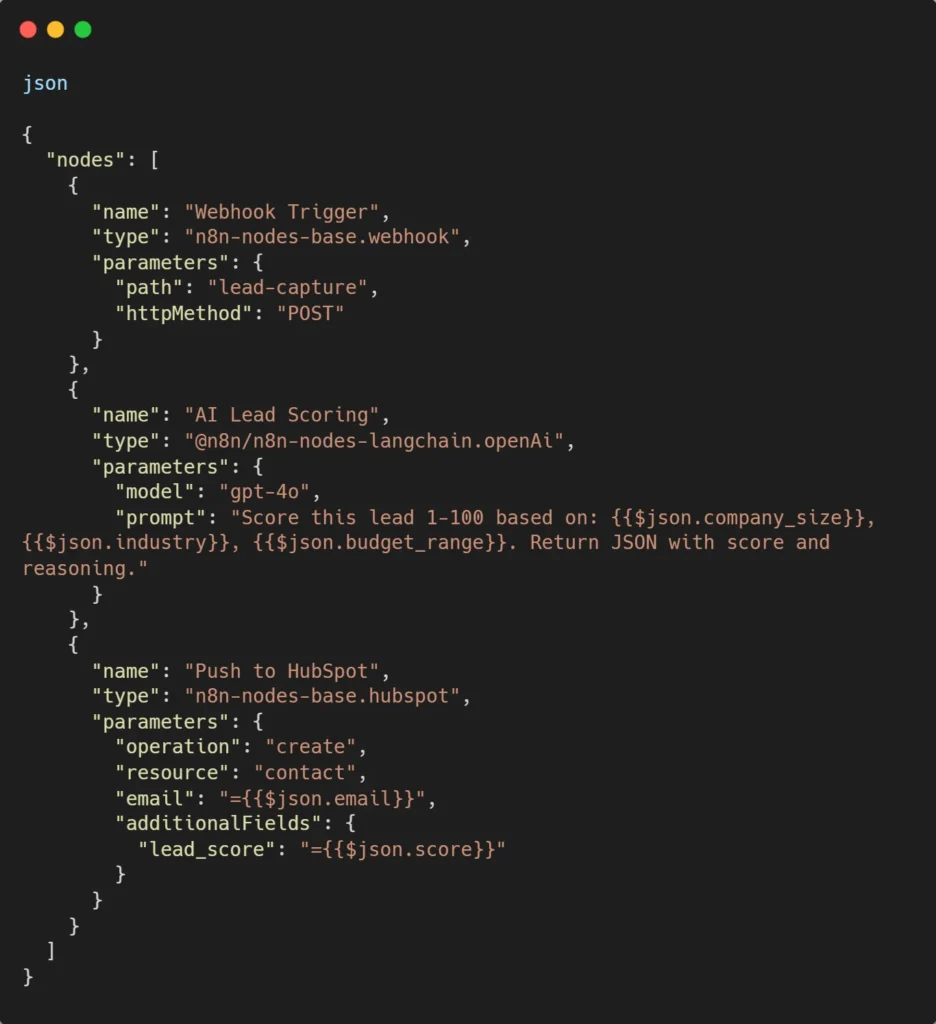
This entire pipeline — webhook trigger, AI scoring, and CRM push — counts as one execution on n8n. On Zapier, it would consume three tasks per run.
So Which One Should You Pick?
If your team lacks technical expertise, if you require the broadest app integration, and if you want to get instant results, then pick Zapier.
Ideal for: marketing teams, smallest businesses, simple, straightforward automations. If you want multi-path workflows to be visually represented and reasonably priced, then pick Make. You also have some technical skills and want a better deal than Zapier, but you do not want to get developer mode.
Ideal for: developing startups, operations teams, and mid-level companies. Pick n8n if the dominion of the team is developers, for self-hosting, data compliance, AI-powered workflows building, or high-volume automations where per-task pricing is becoming unsustainable.
Ideal for: engineering-led organizations, regulated industries, and AI-first companies.
Conclusion: The Right Tool Depends on Your Team, Not the Features List
This conversation is around automation tools. Not really about who offers more bells and whistles. What matters is how well it fits your team’s know-how, grows without breaking your budget, and handles your data needs. Zapier pulls ahead when speed counts. Make delivers solid muscle for the money. Then there’s n8n – total command, leanest cost over time, a natural fit for AI-driven tasks.
Winning at automation by 2026? It isn’t about grabbing the top-rated software. Success comes from choosing what fits your team’s real needs – then using it fully. Not just owning it.
About Orbilon Technologies
Orbilon Technologies is an AI development agency that builds intelligent software solutions for businesses worldwide. From custom web and mobile apps to AI-powered SaaS platforms and workflow automations, our team delivers production-ready solutions built on modern architecture. With years of experience and a 4.96 average rating across Clutch, GoodFirms, and Google, we help B2B companies design, implement, and scale automation systems that drive real ROI.
Need help choosing or implementing the right automation platform? Get a free consultation from our automation experts.
- Rated on Clutch
- orbilontech.com
- support@orbilontech.com
Want to Hire Us?
Are you ready to turn your ideas into a reality? Hire Orbilon Technologies today and start working right away with qualified resources. We will take care of everything from design, development, security, quality assurance, and deployment. We are just a click away.