How AI Reduces Debugging Time by 50%: The Developer's Secret Weapon
Introduction
Every coder has probably been in the same situation, looking at the same error log for hours, the bug not coming to light, and your coffee getting cold. According to research, debugging accounts for 35 to 50% of software development time. Nevertheless, most teams continue to rely on the same manual techniques that were developed a decade ago.
AI debugging tools are revolutionizing the situation. Leading development teams are now able to identify and fix bugs in half the time, not by working harder, but by allowing AI to do the detective work for them. Let’s explore how this change is implemented and how you can apply it to your work.
The Hidden Cost of Traditional Debugging
- Besides being downright annoying, it is also very costly.
- If senior developers spend half their time debugging instead of creating new features, the impact on the product velocity will be huge.
How AI Transforms the Debugging Process
Debugging with AI is a completely different experience from the traditional one. A typical approach requires you to set breakpoints and check variables manually, but AI tools do things differently. They analyze your entire codebase, figure out the state of things, and locate issues with extraordinary accuracy.
- Spotting Patterns: Since AI is exposed to a vast amount of code, it can recognize bug patterns that humans can easily overlook. Having encountered similar issues in numerous projects, they already know what to look for.
- Understanding Context: AI goes beyond just scanning your source code; it actually comprehends the code. So, if you simply tell a bug in easy words, it will understand your reasoning, find the bug, and probably give you a patch.
- Predicting Problems: AI tools are cool because they catch bugs before they even happen! They work with you and check your code as you write it, then suggest the fixes even if the problems aren’t manifest yet.
- Finding the Cause: Instead of just pointing out the error’s location, AI traces the reason behind it. That is a big time saver in terms of rummaging around.
Real-World Use Cases
- Backend API Debugging: Consider a situation where a payment processing API goes down randomly. Normal troubleshooting would require looking at logs, checking database queries, network requests, and so on. AI debugging assistants can scan the complete request flow, detect the race condition in concurrent transactions, and even recommend the precise patchall within 5 minutes!
- Front-End State Management: There’s a problem with your React app where the UI state doesn’t reflect the latest changes correctly. By following the component tree, AI utilities can detect that props are being directly mutated instead of changed immutably and, in that way, point to all instances of the pattern.
- Memory Leak Detection: The memory occupied by your software keeps increasing gradually. AI profiling programs can control the patterns of object allocation and figure out which objects should have been garbage collected but are still retained because of an unknown reference.
- Production Error Analysis: Customers report that the app keeps crashing randomly. AI systems compile thousands of error logs and, after normalizing the error pattern (a certain browser version coupled with a particular user interaction), they point to the culprit code segment without any human intervention.
Industries Benefiting from AI Debugging
- E-commerce Platforms: Bugs during checkout are something that online stores simply cannot tolerate. AI debugging tools can be used to monitor production in real time and identify any issues, such as errors in cart calculation or failures in the payment gateway, before they affect your earnings.
- Financial Technology: Fintech applications need to be completely dependable. AI tools automatically check transaction logic, identify security threats, and make sure that the application complies with the regulations.
- Healthcare Software: There is no room for error in medical applications. AI debugging ensures that data flows are correctly followed, potential for HIPAA violations is eliminated, and patient data integrity is maintained throughout the system.
- SaaS Applications: Cloud software is used by thousands of people at the same time. AI tools can be used to regularly check the software’s performance, identify the cause of the problem before it gets to the user, and recommend ways to improve based on real user behavior.
- Mobile Development: It is very difficult to debug when dealing with hundreds of different device configurations. AI tools take the analysis of crash reports from all devices, help identify issues that are specific to a particular device, and prioritize fixing the most impactful problems.
Practical Implementation Examples
Let’s look at real implementations you can start using today:
1. AI-Powered Error Analysis
Here’s how AI looks at error logs and gives you useful info:
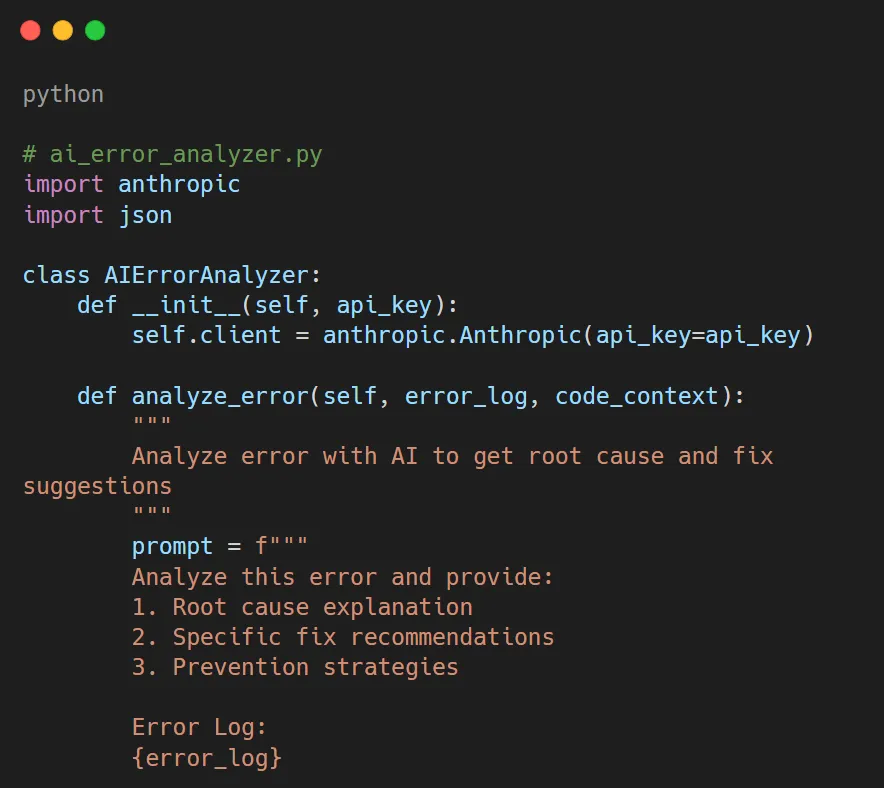
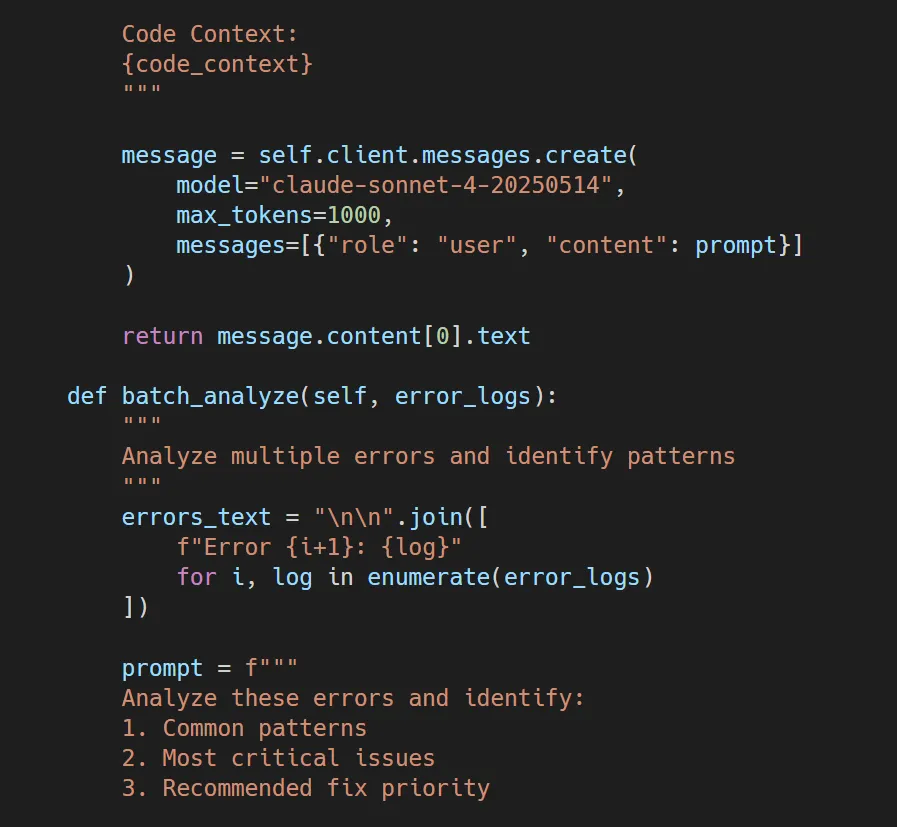
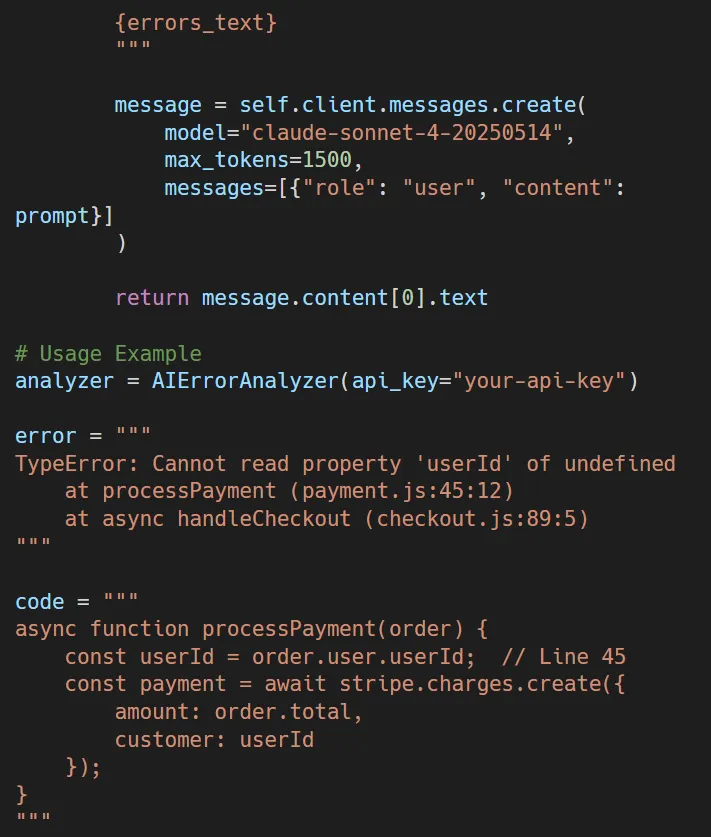

Here’s how AI can check error logs and give you useful advice:
What it does: The AI looks at the error and figures out the order. user is undefined, and tells you to check for null before using nested properties. It also tells you to use defensive programming methods to stop the same thing from happening again.
2. Automated Code Review for Bug Prevention
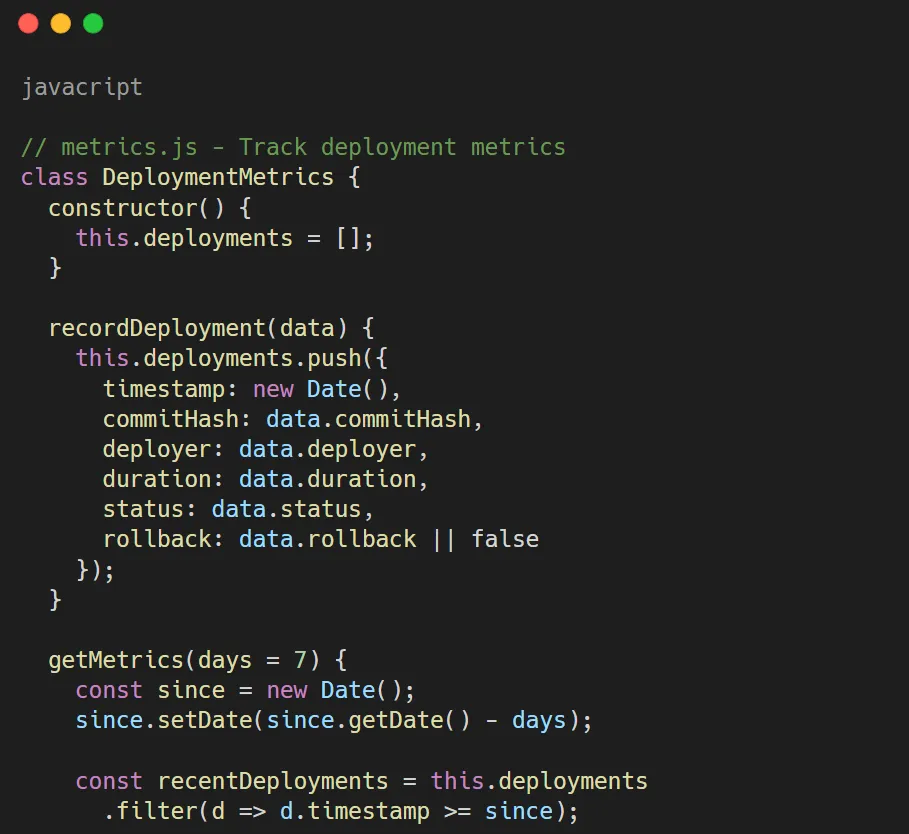
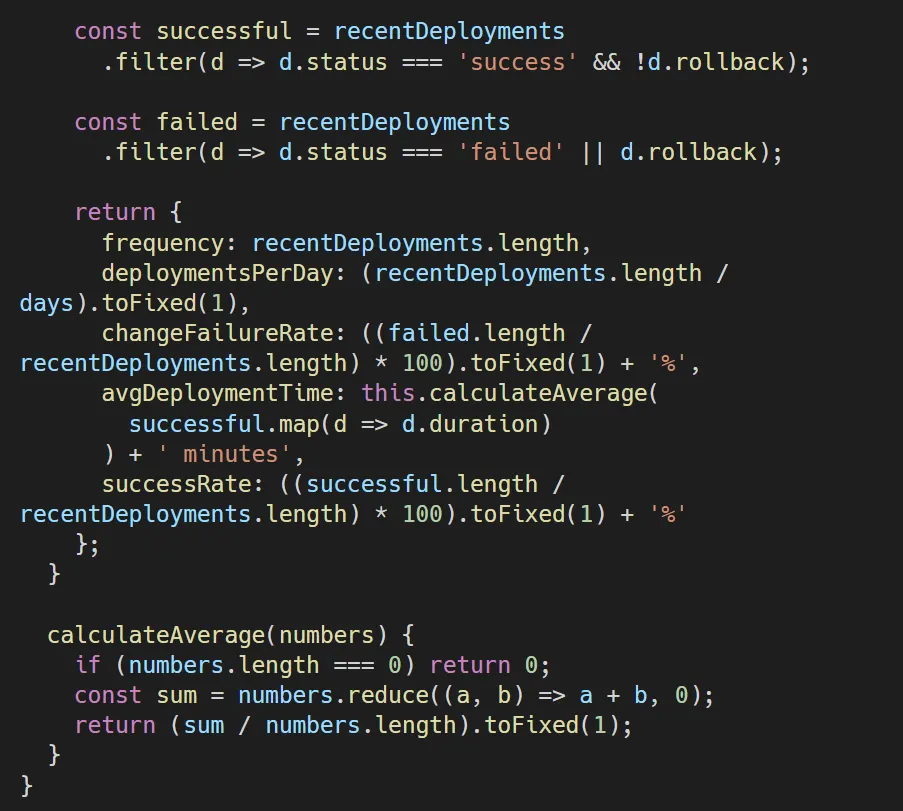
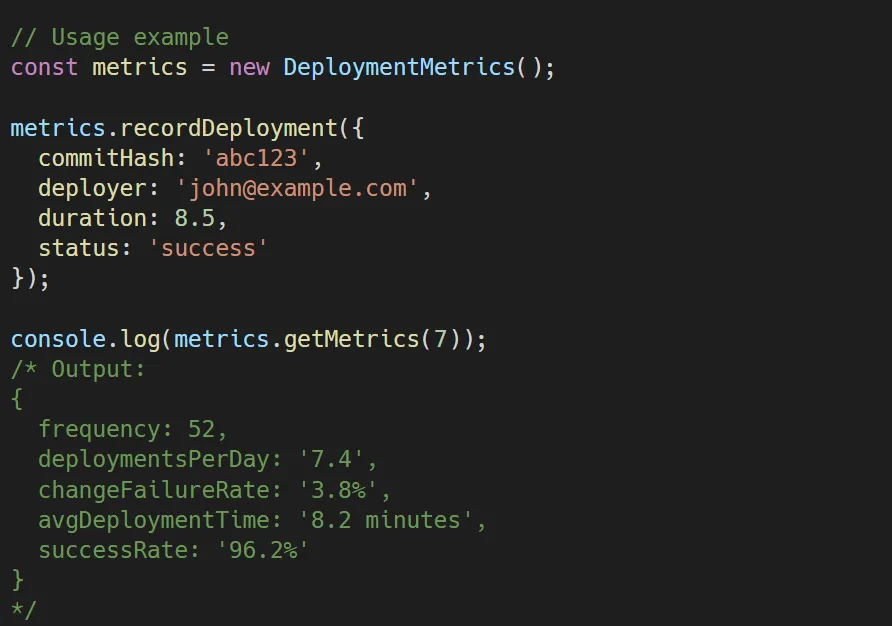
Here’s how AI debugging tools can check code for bugs before they even happen:
3. Intelligent Stack Trace Parser
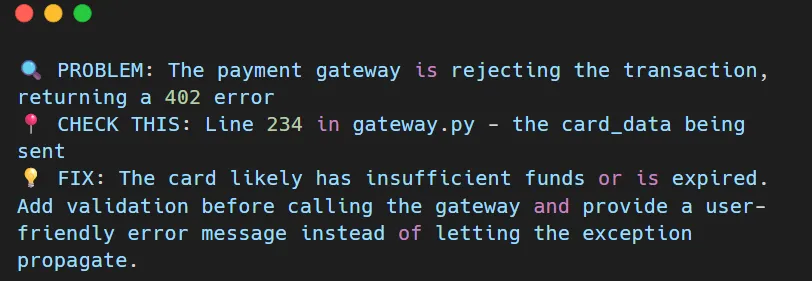
This tool uses AI to make stack traces actually useful:
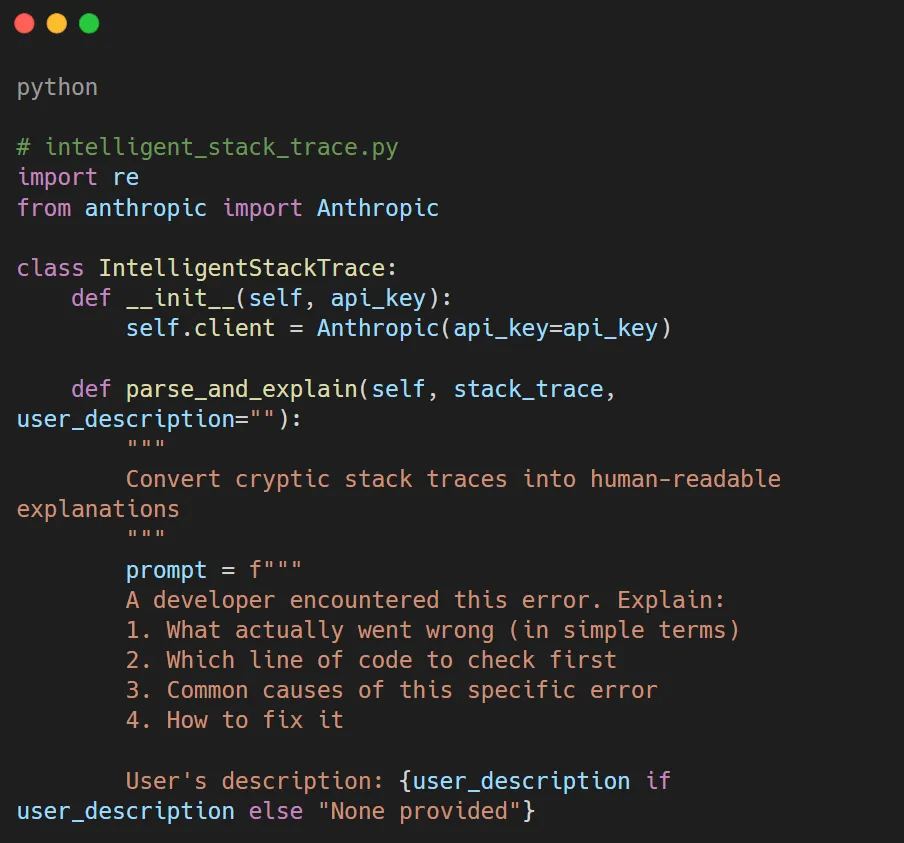
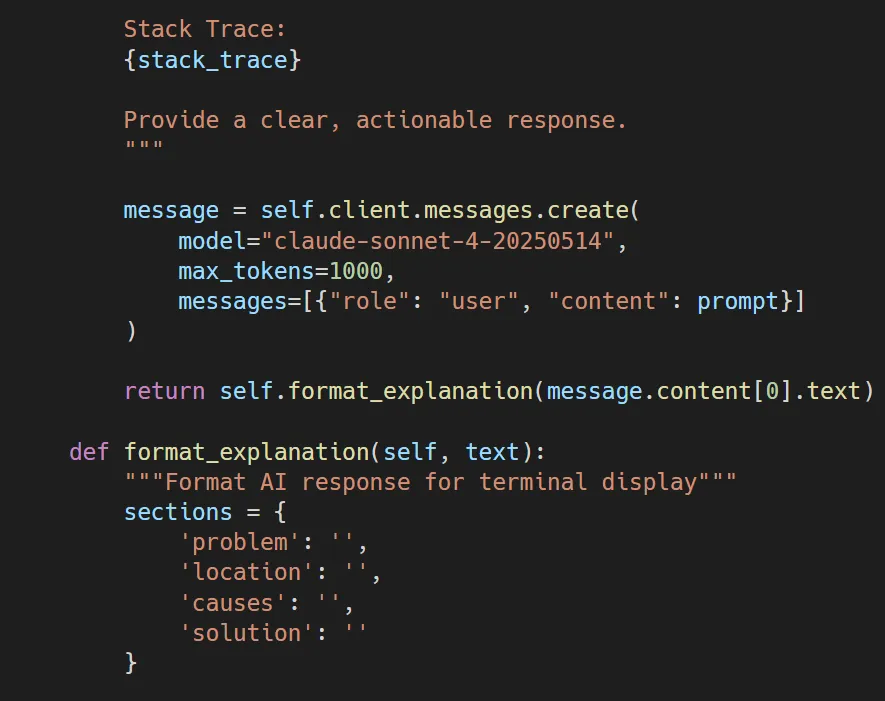
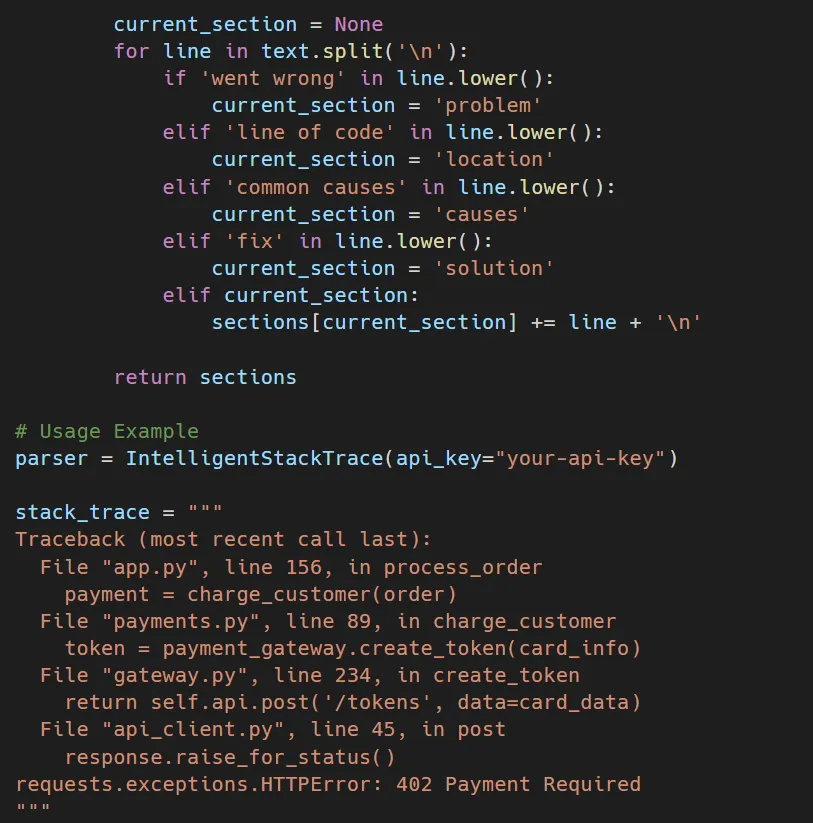
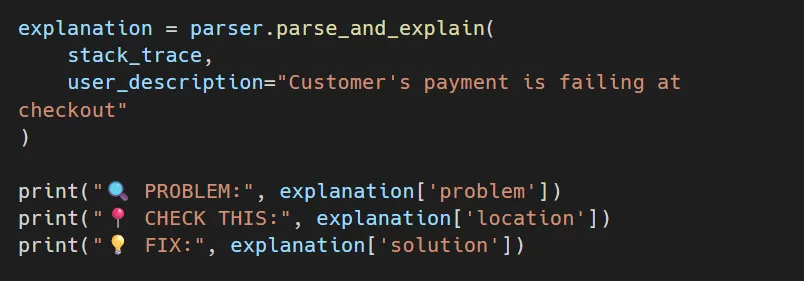
Real output example:
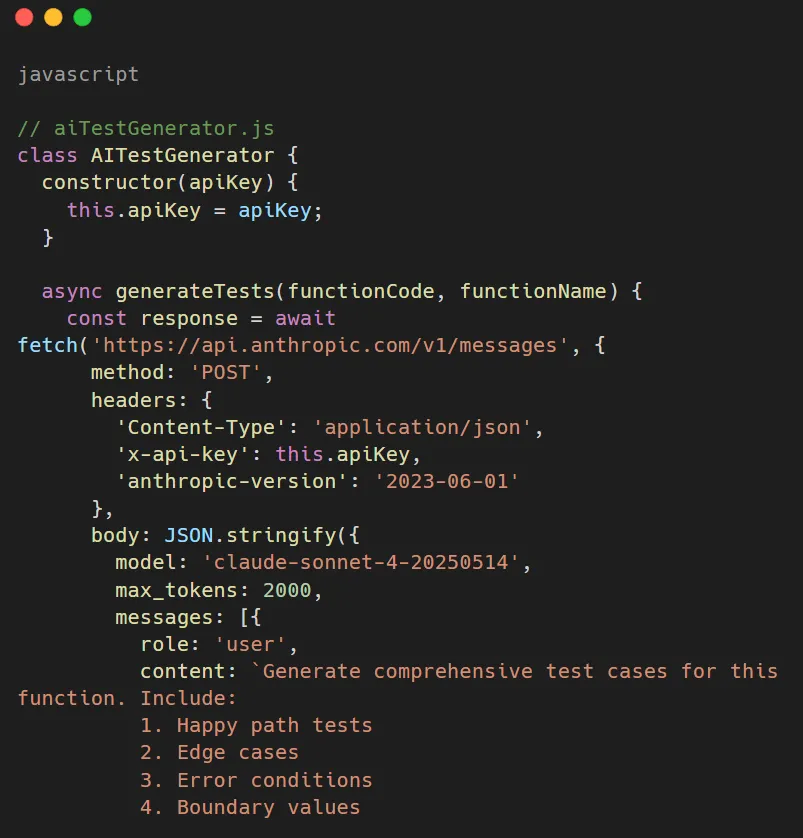
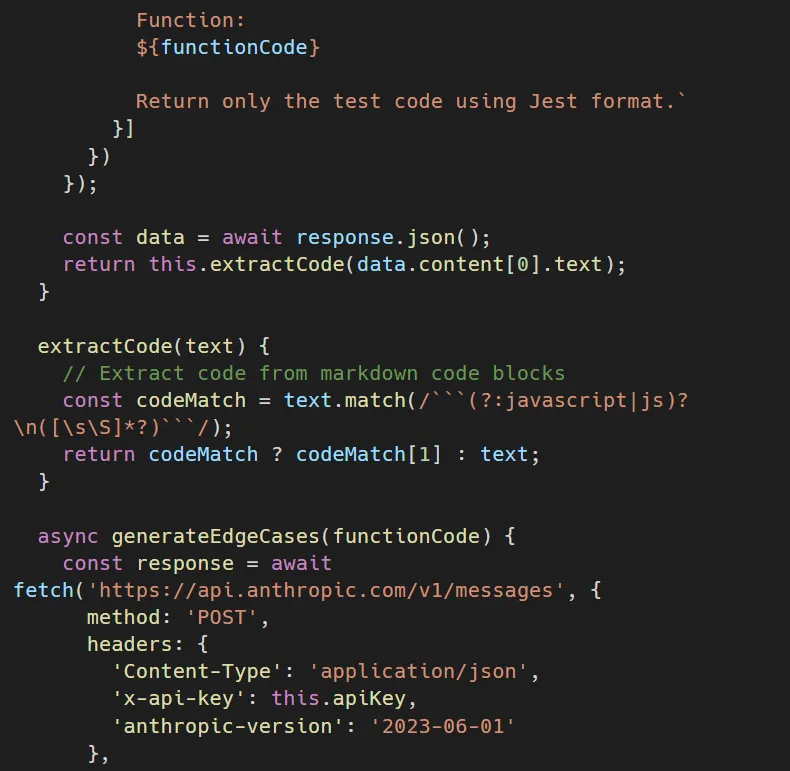
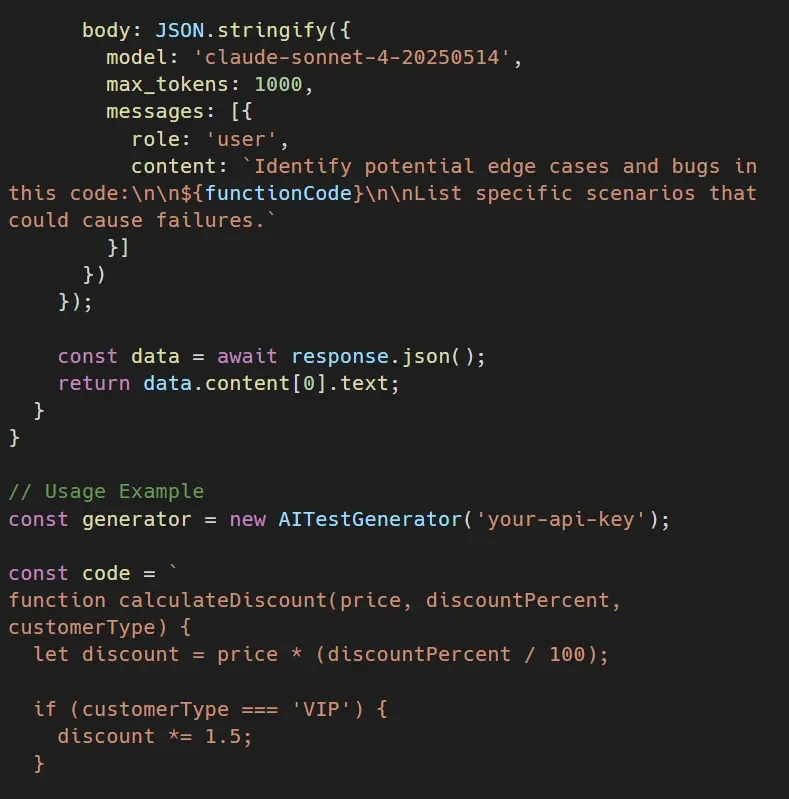
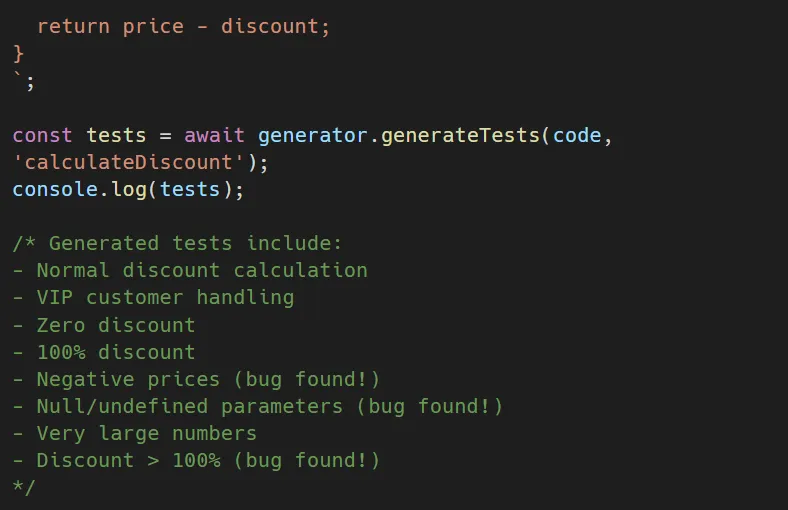
4. AI-Powered Test Generation
Generate tests automatically to catch bugs before they happen:
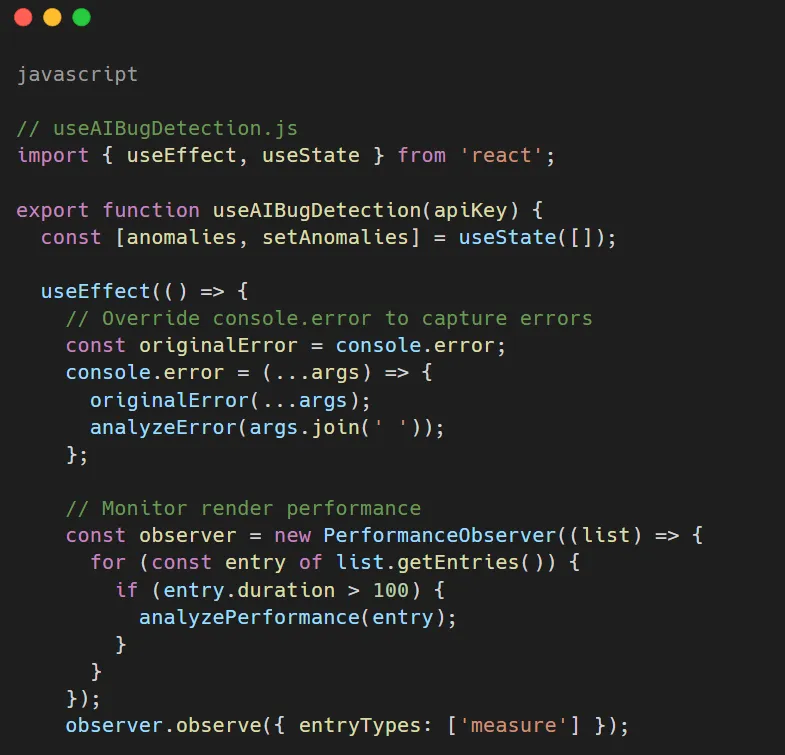
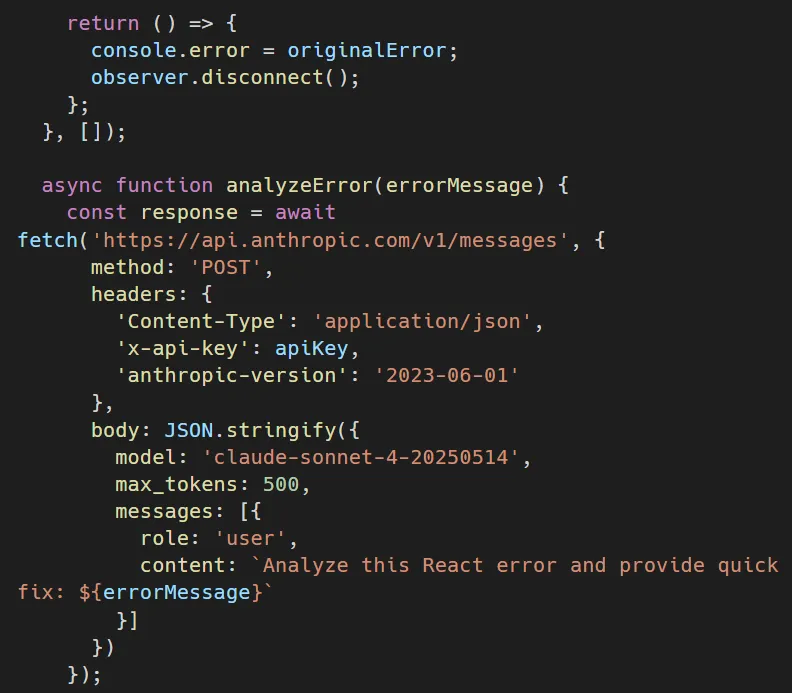
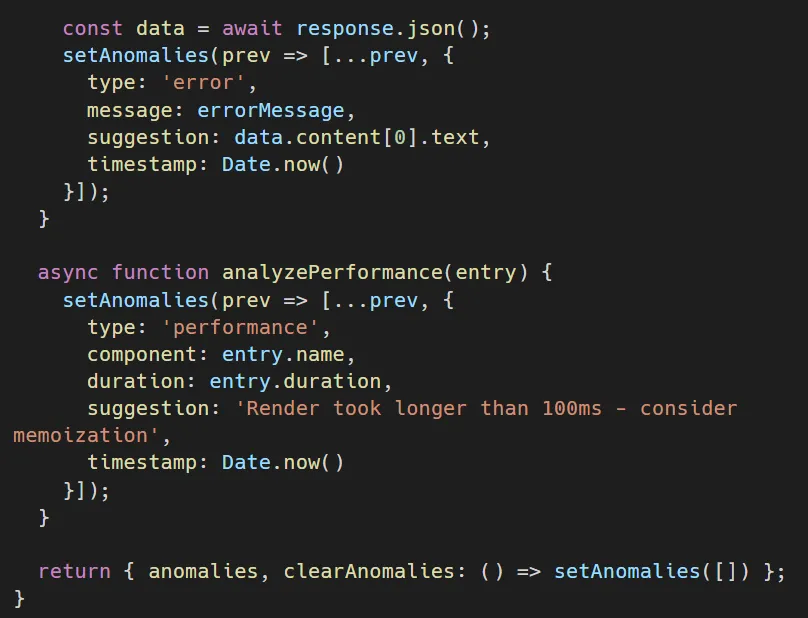
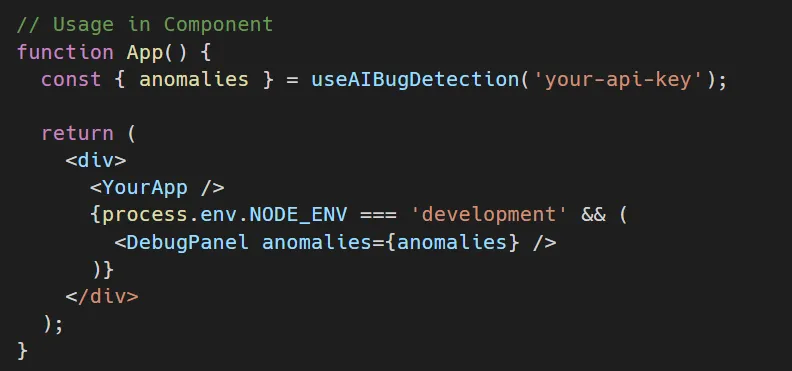
5. Real-Time Bug Detection Hook
This React hook uses AI debugging tools to monitor your application:
Implementation Strategy
- Integrating AI debugging tools doesn’t need a major workflow change; you can start with small steps:
- Week 1- Add AI code review: Make AI part of your code review process in pull requests. Use it to spot the most obvious issues before the code is seen by human reviewers.
- Week 2 – Implement Error Analysis: Link your error logging system with AI analysis. Begin creating a knowledge base of typical problems and their solutions.
- Week 3 – Introduce Real-Time Monitoring: Use AI monitoring in your staging environment. Identify issues before they go live.
- Week 4 – AI, Aided Test Creation: Use AI for creating tests for the new code. Save the testing of complicated business logic for humans.
- Month 2 – Production Level AI Debugging Deployment: Deploy AI debugging tools to production with the necessary safeguards and monitoring.
Measuring the Impact
These are some of the metrics that you can use to track the value of AI debugging tools:
- Time to Resolution: analyze the time spent in bug fixing during the period before and after the AI intervention. Leading teams witness a 40- 60% reduction.
- Bug Detection Rate: Count how many bugs AI gets before they go to production versus how many go unnoticed.
- Developer Satisfaction: Get feedback from the team. Developers affectionately report that their mood is elevated when AI takes care of the monotonous debugging tasks.
- Production Incidents: Track the number and severity of production occurrences. AI-assisted teams generally witness around 30- 50% fewer incidents.
- Code Quality Metrics: Keep track of code coverage, cyclomatic complexity, and technical debt. AI makes it easier to uphold high standards.
Common Challenges and Solutions
- False positives: AI tools can sometimes flag issues that aren’t real bugs. Solution: Adjust confidence thresholds and gradually expose the model to your codebase to get it trained.
- Context limitations: AI may fail to grasp your business logic. Solution: Make sure to have thorough code comments and documentation. AI models will leverage these to generate better recommendations.
- Integration complexity: Introducing new tools within the existing workflow can cause disruption. Solution: Proceed with non-critical projects first. Demonstrate the value before doing a company-wide rollout.
- Developer resistance: Some developers do not trust AI suggestions. Solution: Provide real examples of bugs discovered and time saved. Allow AI to do the tedious work so that developers can concentrate on the system design.
The Future of AI-Assisted Development
We have only just begun to explore AI debugging tools. Even though today’s tools possess fascinating features, the future seems to offer us a lot more:
- Predictive Bug Prevention: The AI will study your code as you type; thus, no bug will be allowed to occur.
- Automated Fix Implementation: Rather than merely suggesting fixes, AI will go ahead to implement and test them automatically, and then submit pull requests for human approval.
- Cross – Repo Learning: AI systems will tap into every codebase in your organization, and thus, they will know your coding style and preferences really well.
- Natural Language Debugging: You just have to tell what the problem is (bug) in simple English, and without you having to worry about the technicalities, the AI gets, analyzes, and fixes the bug.
Conclusion
Debugging time can actually be cut by as much as 50%; it’s not just a dream that’s far away anymore. Teams that have welcomed AI debugging tools are already experiencing this change. The technology is no longer experimental, but a set of reliable, production-ready solutions.
Those developers who will be most successful in the upcoming decade are not going to be those who can manually debug the fastest. Instead, they’ll be the ones who effectively use AI to do the dull detective work, thus releasing their time for the creative problem-solving, solving which truly requires human intelligence.
Why not? Just start small. Choose a single AI debugging tool. Use it for only one workflow. Analyze the outcomes. Then, go further from there. Your future self and your coffee mug will probably want to thank you.
Getting Started with Orbilon Technologies
Orbilon Technologies assists development teams in rolling out AI-powered debugging workflows that offer a clear, quantifiable return. We are the company that will help you whether you are just starting to look at AI debugging tools or you want to optimize an existing implementation. We carry the knowledge to tailor the solution to your tech stack and development culture.
Our team has been able to help companies from e-commerce, fintech, healthcare, and SaaS industries halve or more the time spent on debugging. We don’t only provide you with toolswe bring them into your workflow, train your staff, and record the results.
Do you want to know how to slash your debugging time by 50%? Come and see us at orbilontech.com or send us your questions at support@orbilontech.com. Let’s explore together how AI debugging tools can revolutionize your development process.
Want to Hire Us?
Are you ready to turn your ideas into a reality? Hire Orbilon Technologies today and start working right away with qualified resources. We will take care of everything from design, development, security, quality assurance and deployment. We are just a click away.