
Apple's Xcode 26.3 is embedded with native integration of the Claude Agent SDK
Introduction
Claude Agent SDK is loading over 40+ million developers with smart, goal-oriented, self-correcting AI. On February 3, 2026, Apple announced something that will change the way 40+ million developers create apps forever:
Xcode 26.3 now comes with a built-in integration of Anthropic’s Claude Agent SDK and OpenAI’s Codex.
It is not just one more minor update. It is the time when AI coding assistants were turned into independent AI agents, and Apple has just made that revolutionary tool available to every developer in its environment.
What Just Changed: From AI Assistant to AI Agent?
Let’s be very clear about the change:
BEFORE (September 2025):
- Claude assisted in coding tasks individually.
- Help was only provided step by step.
- Limited to code suggestions.
- Developers did most of the coding manually.
AFTER (February 2026):
- Claude runs autonomously on complicated projects.
- Activities that last for a long time are executed.
- Full comprehension and iteration of the project.
- Through visual confirmation, Claude can SEE what it is building.
This is the departure from AI tools to AI agents. And it has just become the standard gear in the world’s most renowned mobile development environment.
The Big Picture: Apple Embraces Agentic Coding
What Is Agentic Coding?
Agentic codinga phrase coined by AI researcher Andrej Karpathy who referred to it as “vibe coding,” signifies a major transformation in the methodology of developing software.
Traditional Coding:
- You: “Write a function that calculates compound interest”.
- AI: Generates function code.
- You: Copy, paste, integrate manually.
Agentic Coding:
- You: “Build a finance tracker app with compound interest calculations, charts, and dark mode”.
- AI Agent: Plans architecture, creates files, writes code across multiple files, builds UI, tests visually, and iterates until complete.
- You: Review finished app.
The change? You only define goals and not the steps. The AI then comes up with the means to achieve them.
Why This Matters Now?
In Apple’s press release, it is mentioned that Xcode 26.3 is the IDE (integrated development environment) that brings the concept of agentic coding straight into the interface, enabling the development of various platforms, such as:
- iOS apps (iPhone).
- iPadOS apps (iPad).
- macOS apps (Mac).
- watchOS apps (Apple Watch).
- tvOS apps (Apple TV).
- visionOS apps (Apple Vision Pro).
With more than 40 million registered Apple developers across the globe, this move has made the autonomous AI agents available to a huge developer community, thus making a significant impact on the planet.
The Claude Agent SDK Integration: Technical Deep Dive
What Makes It Special:
Xcode 26.3 comes with a brand new feature that allows native integration with the Claude Agent SDK, the very same core harness that powers Claude Code. Simply put, this opens the doors for developers to leverage the full potential of Claude Code right inside Xcode, for instance:
- Subagents: Claude can spawn specialized subagents for different types of tasks.
- Background Tasks: Even long, running tasks operate smoothly without blocking your main line of work.
- Plugins: You can extend and customize the architecture to your own tools and integrations.
- Model Context Protocol (MCP): This is an open standard that facilitates communication between AI and IDE.
Moreover, everything just works perfectly, and there is no need to leave Xcode.
Visual Verification: Claude Can SEE What It Builds
This is the revolutionary feature that makes Xcode 26.3 radically different:
- CAPTURES XCODE PREVIEWS: Claude can take pictorial representations of SwiftUI interfaces during the process of their construction.
- ANALYZES VISUAL OUTPUT: Detects various issues such as design flaws, misalignments, problems in spacing, and inconsistencies in colors.
- ITERATES AUTOMATICALLY: Based on what it sees, it goes ahead and corrects the faults without any human input.
RESULT: First time pixel-perfect UI.
Anthropic refers to this as the treatment where Claude is essentially “seeing what the interface it’s building looks like in practice, identifying any issues with its view, and then iterating from there.”
For SwiftUI development, where the visual output is paramountthis is a revolutionary change.
How It Actually Works in Practice
Here’s the autonomous execution flow:
YOU SAY: “Build a weather app with location services”.
CLAUDE DOES:
- Explores project file structure – Understands existing architecture.
- Searches Apple documentation – Finds relevant APIs (CoreLocation, WeatherKit).
- Plans architecture changes – Decides which files need modification.
- Writes code across multiple files – Views, ViewModels, Services, Models.
- Verifies visually via Previews – Captures screenshots to check UI.
- Iterates until complete – Fixes issues autonomously.
- Provides a summary – Explains what was built and why.
You give Claude a goal, not a task list.
The Integration Options: Claude Agent and OpenAI Codex
Apple has collaborated closely with Anthropic and OpenAI to fine-tune their agents for Xcode.
a. Claude Agent Capabilities
- Locates reasons for changes in codebases.
- Understands the relationships between SwiftUI, UIKit, and Swift Data.
- Identifies dependencies across files and frameworks.
- Simply achieves top-level goals through specific tasks.
- Creates or modifies files based on content.
- Other APIs and frameworks selection is the result of choosing.
- Captures Xcode Previews during development.
- Evaluates the visual quality of the interface.
- Design iteration without prompting.
- Searches Apple’s developer documentation directly.
- Understands the latest APIs and best practices.
- Applies platform-specific conventions.
b. OpenAI Codex Capabilities
Deep Pattern Recognition:
- Leverages training on massive code repositories.
- Recognizes common iOS development patterns.
- Applies idiomatic.
- Swift coding styles.
Multi-Framework Fluency:
- Works across Swift, SwiftUI, UIKit, and Combine.
- Understands iOS SDK comprehensively.
- Handles platform, specific requirements.
c. Choosing Between Agents:
Go with the Claude agent if:
- You are creating complicated projects with multiple files.
- You require reasoning and planning at a high level.
- Visual checking is very important.
- You are working with the latest Apple frameworks.
Use Codex when:
- Codex is your choice when you need precise code pattern matching.
- You are performance optimizing.
- You are handling legacy codebases.
- You are an OpenAI ecosystem fan.
Flexibility: Apple has designed Xcode 26.3 to make it easy for change agents to pick the right tool for each job.
Model Context Protocol: The Open Standard
Apple suddenly did something rather unexpected: instead of creating proprietary, closed integrations between their different functions, they went with the Model Context Protocol (MCP), which is basically an open standard of communication between AI and IDE.
What This Means:
Any MCP, Compatible Agent Works: Not only limited to Claude and Codex, but any agent supporting MCP can integrate.
Developer Flexibility:
- Use multiple agents at the same time.
- Change according to the task.
- Future, proof against vendor lock-in.
Ecosystem Growth: Enables third-party AI tools to integrate seamlessly.
Standards-Based Approach: Prevents fragmentation, encourages interoperability.
This surprise move is really quite unlike Apple’s tradition, and excited developers are reveling in openness.
Real-World Use Cases: What You Can Actually Build
1. Complete App from Description
Request: “Build a habit tracker with local notifications, dark mode, and iCloud sync.”
Claude Agent:
- Creates a SwiftUI view hierarchy.
- Implements CoreData model.
- Adds NotificationManager.
- Configures iCloud entitlements.
- Builds the settings screen.
- Tests across devices via Previews.
Time: Minutes, not hours or days.
2. Feature Addition to Existing App
Request: “Add authentication with Sign in with Apple and biometric unlock.”
Claude Agent:
- Analyzes existing architecture.
- Adds AuthenticationKit integration.
- Implements SignInWithApple.
- ButtonAdds Local.
- Authentication for Face ID/Touch ID.
- Updates Info.plist with required capabilities.
- Tests authentication flow.
Benefit: Understands the context of existing code.
3. UI Redesign with Visual Verification
Request: “Redesign the settings screen to match iOS design guidelines.”
Claude Agent:
- Caches current Previews.
- Detects design problems.
- Reconstructs with accurate spacing, colors, and typography.
- Uses visual feedback for iteration.
- Delivers a flawless final result.
Benefit: Actually understands what it’s constructing.
4. Documentation and Code Cleanup
Request: “Add comprehensive documentation and refactor for Swift best practices.”
Claude Agent:
- Inspects the whole codebase.
- Inserts DocC documentation comments.
- Upgrades to Swift 6 concurrency.
- Removes compiler warnings.
- Enhances code layouts.
Value: Maintains consistency across large projects.
5. Performance Optimization
Request: “Optimize this view for better performance.”
Claude Agent:
- An analysis of the rendering behavior.
- Identifies the points where the operations are highly costly.
- Properly implements memoization, which is a way to speed up computer programs by saving the results of functions for use in later calculations.
- Adds @MainActor annotations to the specified locations.
- Test the improved performance.
Impact: Production, ready optimizations.
6. Test Suite Generation
Request: “Create comprehensive unit and UI tests.”
Claude Agent:
- Analyzes code structure.
- Generates XCTest test cases.
- Creates UI test scenarios.
Implements edge case testing. - Runs test suite and fixes failures.
Coverage: Comprehensive testing is automatic.
September 2025 vs. February 2026: The Evolution
i. September 2025 (Xcode 26)
- Turn, by, turn coding assistance.
- Code completion and suggestions.
- Help with bug fixing. Documentation generation.
- Single, file operations only.
ii. February 2026 (Xcode 26.3)
Claude Agent SDK Integration:
- Autonomous multi-file projects.
- Goal, goal-driven development.
- Visual verification and iteration.
- Self-correction and improvement.
- Background task execution.
- Full project comprehension.
Interaction Model: You set a goal – Claude executes – You review the complete feature.
Time Savings: Dramatic (5 – 10x faster for many tasks).
The move from “assistant” to “agent” is really significant.
Installation and Setup: Getting Started
System Requirements
- A Mac with Apple Silicon (M1 or later) or an Intel Mac.
- macOS 14.0 or later.
- At least 8GB RAM (16GB recommended).
- Xcode 26.3 Release Candidate (available now for Apple Developer Program members).
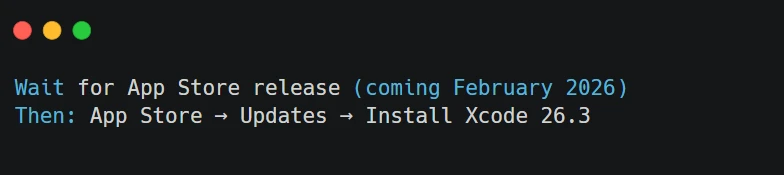
- Xcode 26.3 (coming soon to App Store for all users).
- Anthropic Claude account + API key, OR.
- OpenAI account + API key, OR.
- Any MCP-compatible agent.
Installation Steps
Step 1: Update Xcode
If you’re an Apple Developer Program member:
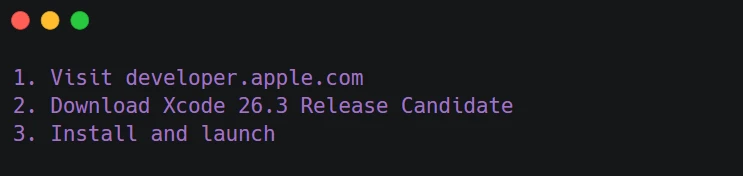
For everyone else:
Step 2: Configure Agent
In Xcode settings:

One-Click Install Options:
- Click “Add Claude Agent” → Sign in with your Anthropic account.
- Click “Add Codex” → Sign in with OpenAI account.
- Click “Add Custom Agent” → Enter MCP server details.
Agents update automatically once configured.
Step 3: Set API Keys
For Claude:

For Codex:

Step 4: Test Your Agent
Open any project and try:
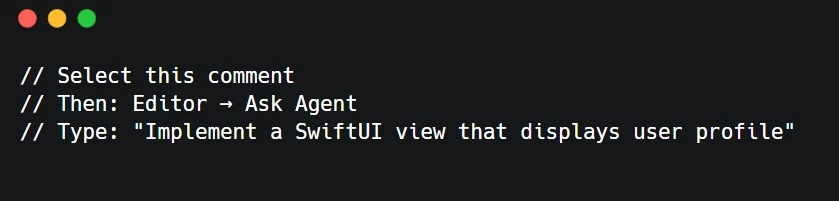
The agent will generate code autonomously.
MCP Configuration for Advanced Users
For custom MCP agents:
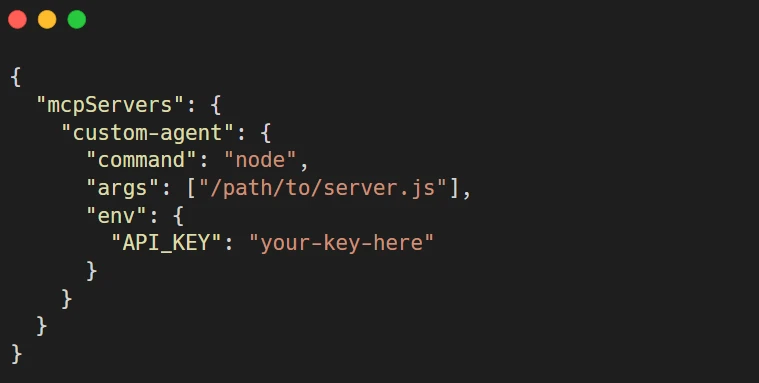
Add to: ~/Library/Application Support/Xcode/Agents/config.json.
Important Capabilities of Xcode 26.3 Agent Integration
1. Documentation Search:
Agents have a tool to search Apple’s documentation right away:
- “Claude, how do I implement drag and drop in SwiftUI?. “
- Claude goes to developer.apple.com, locates the onDrag and onDrop modifiers, and correctly implements them.
2. File Structure Exploration:
Agents know your entire project:
- “Refactor my networking layer to use async/await.
- “Claude figures out the dependencies and updates every call site accordingly while keeping everything consistent.
3. Build and Test Execution:
Agents can build and test the code:
- “Build this feature and fix any errors”.
- Claude builds the project, checks error messages, and reverts the problematic changes until everything is fine.
4. Visual Verification:
Agents take UI screenshots and analyze them:
- “Make this view match the iOS design guidelines”.
- Claude captures a screenshot of the view, finds the problematic parts, and repeats the process until he is sure it is compliant.
5. Project Settings Management:
Agents modify configuration:
- “Add push notification capability.
- “Claude changes entitlements, Info.plist, and project settings accordingly and automatically.
6. Multi-file Coordination:
Agents operate at the cross-file level:
- “Implement MVVM architecture for this feature”.
- Claude generates the necessary files: Models, Views, and ViewModels, and thus the proper separation.
7. Code Review and Refactoring:
Agents raise the standard of the code:
- “Review this code for Swift best practices”.
- Claude points out the situations, provides suggestions, and executes them.
8. Natural Language Understanding:
Agents analyze complex demands:
- “Add a settings screen with toggles for notifications, analytics, and theme selection.”
- Claude understands the requirements, breaks them down into tasks, and implements them completely.
Performance and Efficiency Optimizations
Apple collaborated with Anthropic and OpenAI to optimize the agents, especially for Xcode:
1. Token Usage Reduction
Problem:
Every single request requires API tokens ($).
How to solve:
Apple has developed ways of cutting the token usage significantly:
- Smart context choice (only relevant code is sent).
- Prompt engineering is done very carefully.
- Documentation that is frequently used is cached.
- Incremental changes instead of rewrites of the whole text.
Result: Developers get cheaper costs.
2. Response Speed
Problem:
Waiting for AI responses disrupts the user\’s flow.
How to solve:
- Execution of background task.
- Streaming of responses.
- Step-wise coding.
- Multi, agent sub, operations in parallel.
Result: Developers are getting work done faster.
3. Accuracy Improvements
Problem:
Generic AI makes errors that are not typical for the platform.
How to solve:
- Apple-provided training data.
- Platform-specific fine-tuning.
- Access to the latest documentation.
- Best practices enforcement.
Result: Higher quality, production-ready code.
Security and Privacy Considerations
How Data Is Handled
Code sent to AI services:
- The only code you give the agent permission to use.
- Encrypted connections are used for transmission.
- Under Anthropic/OpenAI privacy policies.
Code NOT sent:
- Code that you didn’t explicitly ask about.
- Project files outside the request context.
- Private keys, credentials, secrets.
Best Practices:
- Always verify agent requests before giving the go-ahead.
- Never share sensitive code with AI services.
- Keep secrets in environment variables.
- Check the generated code before you commit it.
- Know the terms of service for AI providers.
Apple's Approach
- No Apple, Side Processing: Artificial Intelligence is utilizing Anthropic/OpenAI infrastructure, not Apple’s.
- Developer Control: Developers decide what agent to use and what information to share.
- Transparency: Being very clear when code or data moves outside your device.
- Opt In: Agents are turned off by default and have to be intentionally enabled.
Industry Impact: What's the Meaning of This?
a. Development done by Individual Developers
- Productivity Explosion: Work that previously took a week can now be done in a few hours. Work that took a few hours can now be done in a few minutes.
- Lower Barrier to Entry: Junior developers with agents assisting can produce work equivalent to that of senior developers.
- Learning Accelerator: Agents teach by building, explaining code, and demonstrating good practices.
- Faster Prototyping: Going from concept to the functional program takes hours rather than weeks now.
b. For Development Teams
- Velocity Increase: Sprint capacity can be 2 to 5 times higher with agent support.
- Code Quality: Agents maintain code quality by constantly enforcing best practices.
- Onboarding Speed: New employees get productive faster thanks to AI help.
- Focus Shift: Developers focus more on architecture and less on boilerplate since AI handles the latter.
c. For the Apple Ecosystem
- App Quality Improvement: Better tools naturally lead to higher-quality apps.
- Innovation Acceleration: Lower costs of development allow for more experimentation.
- Platform Adoption: More apps for visionOS and watchOS as development becomes easier.
- Competitive Pressure: Other platforms are forced to improve their AI tooling to the level of Apple’s or even surpass it.
d. For the AI Industry
- Validation of Agentic Approach: The fact that Apple endorses autonomous AI agents is a big plus for their legitimacy in the market.
- Standard Setting: Model Context Protocol turns into the industry standard.
- Market Expansion: The whole community of 40 million developers becomes users of AI agents.
- Competition Intensifies: Pressure on Anthropic, OpenAI, and emerging players.
Comparison: Xcode Agents vs. Other AI Coding Tools
i. Xcode 26.3 vs. GitHub Copilot
Copilot Strengths:
- Works in any IDE (VS Code, JetBrains, etc.).
- Excellent code completion.
- Trained on a massive code corpus.
- Lower cost.
Xcode 26.3 Strengths:
- True agentic capabilities (not just completion)
- Visual verification unique to iOS development.
- Native Apple documentation access.
- Multi-file project understanding.
- Platform-optimized (iOS, macOS, etc.).
Best For: Use Xcode agents for Apple platform development, Copilot for cross-platform or non-Apple work.
ii. Xcode 26.3 vs. Cursor
Cursor Strengths:
- Excellent context understanding.
- Multi-language support.
- Fast inline editing.
- Works across ecosystems.
Xcode 26.3 Strengths:
- Native Xcode integration.
- Visual Previews feature.
- Apple-specific optimizations.
- Backed by Apple engineering.
Best For: Use Xcode for Apple development, Cursor for general-purpose AI coding.
iii. Xcode 26.3 vs. Claude Code (CLI)
Claude Code Strengths:
- Works in terminal/any IDE.
- Maximum flexibility.
- No Xcode dependency.
- Cross-platform.
Xcode 26.3 Strengths:
- Visual verification of UI.
- Native Xcode features integration.
- One-click setup.
- Designed for Apple platforms.
Best For: Use Xcode for GUI-heavy iOS/Mac apps, Claude Code for backend/cross-platform work.
ROI Analysis
Time Savings Value: If the agent saves 10 hours/week at $100/hour, = $1,000/week saved.
Monthly Cost: $100
Monthly Value: $4,000+
ROI: 40:1 or better for most professional developers
For enterprises paying developer salaries, the math is even more compelling.
Limitations and Considerations
What Agents Can’t Do (Yet)
- Architectural Decisions: Agents can help to implement the architecture you have decided on, but they should not make fundamental architectural changes without human decision and control.
- Product Requirements: Agents will produce what you have asked for. If you want them to produce what users actually need, then a product thinker will be required.
- Creative Vision: Agents can put a design into practice, but setting the app’s creative direction shouldn’t be one of their tasks.
- Debugging Complex Edge Cases: Agents can easily handle common bugs, but some very unusual problems may require a human expert.
- Strategic Trade-offs: Technical debt, performance vs. simplicity, maintainabilityhuman judgment and decision-making are necessary here.
Orbilon Technologies Point of View
We at Orbilon Technologies have been observing the changes in the AI coding sector for tools for a long time. The article Xcode 26.3 Claude Agent SDK integration marks a big change.
The reason for this is that the technology is now available.
Assistance with coding via AI has been a thing of the near future, and only to a certain extent, over the last couple of years. With the capability for agents, visual confirmation, and setting up within the IDE, the tools have been radically changed for the better.
The change from software to agents.
This is no small change in the tools being used. It is an altogether different way of building software. The development of agentic companies will enable them to gain major competitive advantages.
The question: Are YOU ready?
The device is there. The combination of features is coming. What is left is the question: will you change your procedures, workflows, and team structures to get the most out of these capabilities?
How Orbilon Technologies Can Help?
We help enterprises navigate this transition:
Agentic AI Architecture Design:
- Evaluate which development tasks suit agentic AI.
- Design workflows that maximize agent effectiveness.
- Balance automation with human oversight.
Autonomous Workflow Deployment:
- Implement agent-driven development processes.
- Train teams on effective agent collaboration.
- Measure and optimize agent productivity.
AI Integration with Existing Infrastructure:
- Connect agents to your CI/CD pipelines.
- Integrate with project management tools.
- Automate testing and deployment.
Production-Ready Solutions:
- Code review processes for agent-generated code.
- Quality assurance frameworks.
- Security and compliance considerations.
Conclusion: The Dawn of Agentic Development
Use of Apple’s integration of Claude Agent SDK in Xcode 26.3 goes far beyond a mere feature upgrade. The message is clear: autonomous AI agents are now the staple developer tools.
Opening up to 40+ million developers the capability to utilize goal, oriented, self, self-correcting AI that understands its own creations and can improve them independently, we are stepping into a new software development era.
Here is the transformation:
- From AI assistants to AI agents.
- From code completion to autonomous development.
- From the tool augmentation to the workflow transformation.
It’s no longer a matter of if you should get on board with agentic coding.
It is: how quickly can you get used to a world where this is the normal thing to do?
The tech is set. Xcode 26.3 is releasing in February 2026.
Contact Us:
Ready to transform your development process?
Email: support@orbilontech.com
Website: https://orbilontech.com
Let us help you move at AI speed.
Additional Resources
Official Documentation:
- Apple Developer: https://developer.apple.com/xcode/
- Anthropic Claude Agent SDK: https://www.anthropic.com/news/apple-xcode-claude-agent-sdk
- Model Context Protocol: https://modelcontextprotocol.io/
Getting Started:
- Download Xcode 26.3: https://developer.apple.com/download/
- Anthropic API Keys: https://console.anthropic.com
- OpenAI API Keys: https://platform.openai.com
Community:
- Apple Developer Forums: https://developer.apple.com/forums/
- Anthropic Discord: https://discord.gg/anthropic
Want to Hire Us?
Are you ready to turn your ideas into a reality? Hire Orbilon Technologies today and start working right away with qualified resources. We will take care of everything from design, development, security, quality assurance and deployment. We are just a click away.