
PromptBatch: The Best AI Batch Prompt Processing Web App | Orbilon Tech
Project Overview
PromptBatch Portal is a powerful AI batch prompt processing app built by Orbilon Technologies that allows businesses and developers to run hundreds or thousands of AI prompts at once, at up to 50% less cost compared to running them one by one. The portal accepts file uploads in CSV, XLSX, TXT, and XML formats and integrates directly with both OpenAI and Anthropic Claude’s latest models.
Instead of manually firing prompts one at a time, users simply fill in a template file with their prompts, upload it to the portal, configure their AI engine and model, and let PromptBatch handle everything — from cost estimation and Stripe payment to job scheduling and email delivery of the completed results file.
This AI batch prompt processing app is built for companies that need to run large volumes of AI queries efficiently — where speed is flexible, but cost savings are essential.
The Problem We Solved
Running large volumes of AI prompts individually is expensive and time-consuming. Businesses that need to process product descriptions, rewrite content at scale, generate structured AI responses, or run bulk queries face a painful choice — either build their own batch pipeline or pay full per-prompt API costs.
OpenAI and Claude both offer batch processing APIs at up to 50% reduced cost — but using them directly requires technical setup, token management, payment logic, and result delivery infrastructure that most companies cannot build in-house.
PromptBatch solves this entirely by packaging the full workflow inside a clean, no-code AI batch prompt processing app that any team member can operate without writing a single line of code.
Our Solution: A Complete AI Batch Prompt Processing App
Orbilon Technologies designed and built PromptBatch Portal as a full end-to-end platform. Here is how it works step by step:
Step 1: Sign Up, Login & AI Profile Setup
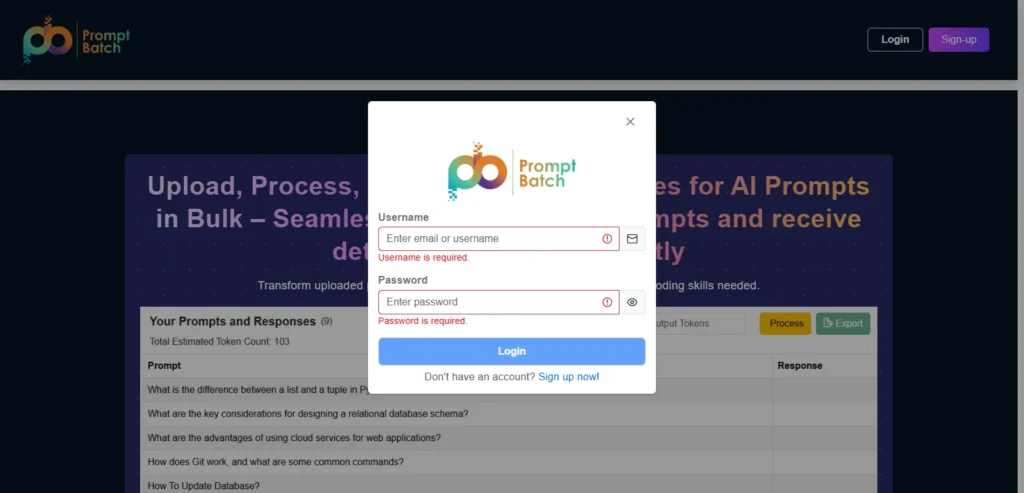
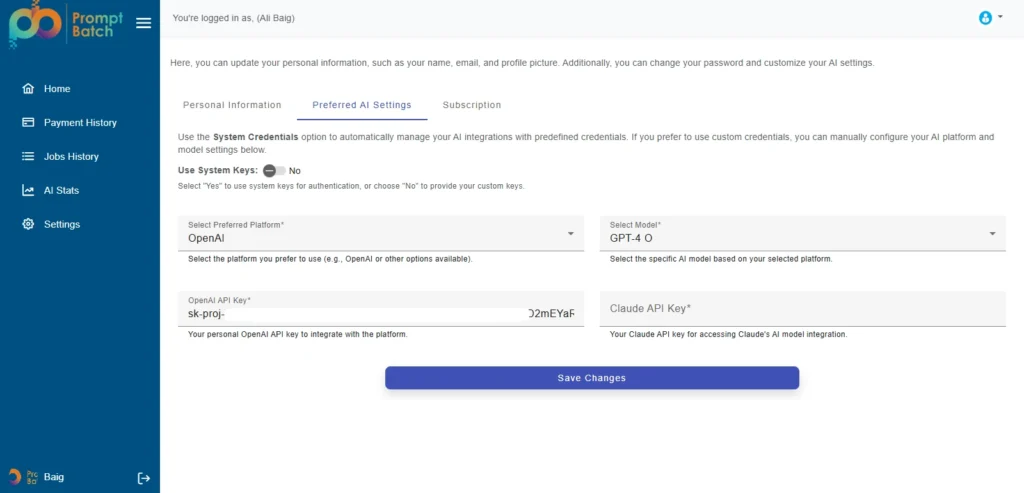
Users create accounts and log in through their email addresses. Each user has the ability to change their details and set up their personal AI preferences in the profile settings. These preferences may include picking the default AI engine (OpenAI or Claude), selecting a specific model like GPT, 4o, and optionally providing their own API key.
By linking a personal API key, a user is only charged a small platform fee by the portal instead of the entire token cost, thus it is quite a lot more affordable for power users and large teams.
Step 2: Get the Template & Write in Prompts
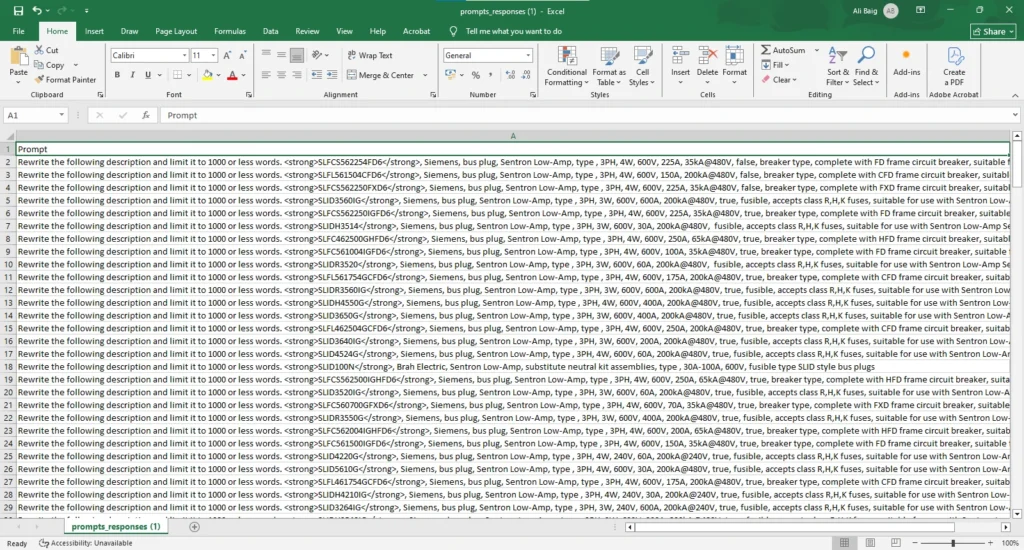
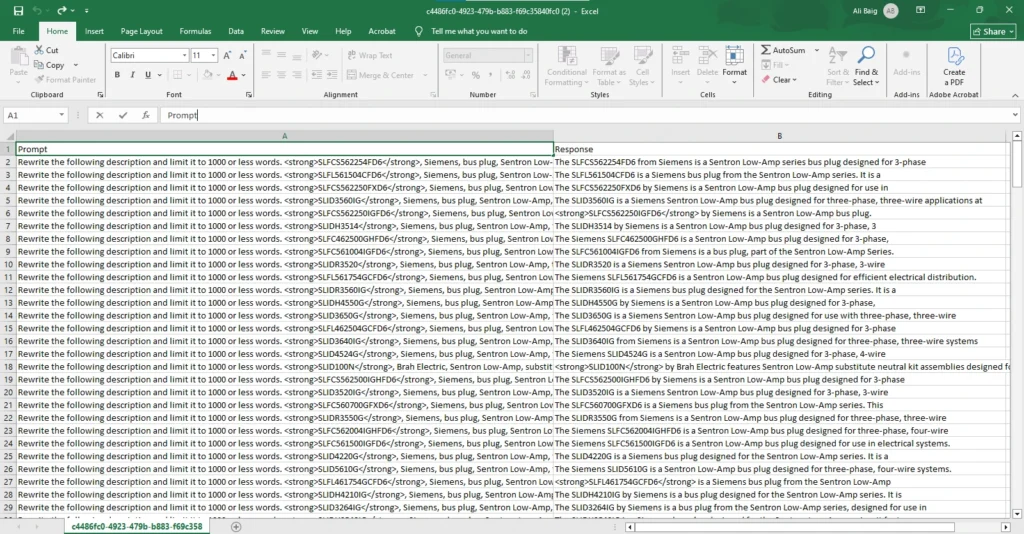
Users select and download a pre-made template from the portal. These are offered in CSV, XLSX, TXT, or XML format. From the single template the user receives, there are only two columns: Prompt and Response. The user writes all the prompts they want to use in the Prompt column, keeps the Response column empty, and then uploads the file back to the portal.
This two-column format makes it easy, with no formatting or technical skills required.
Step 3: Configure Batch Settings & Get Cost Estimate
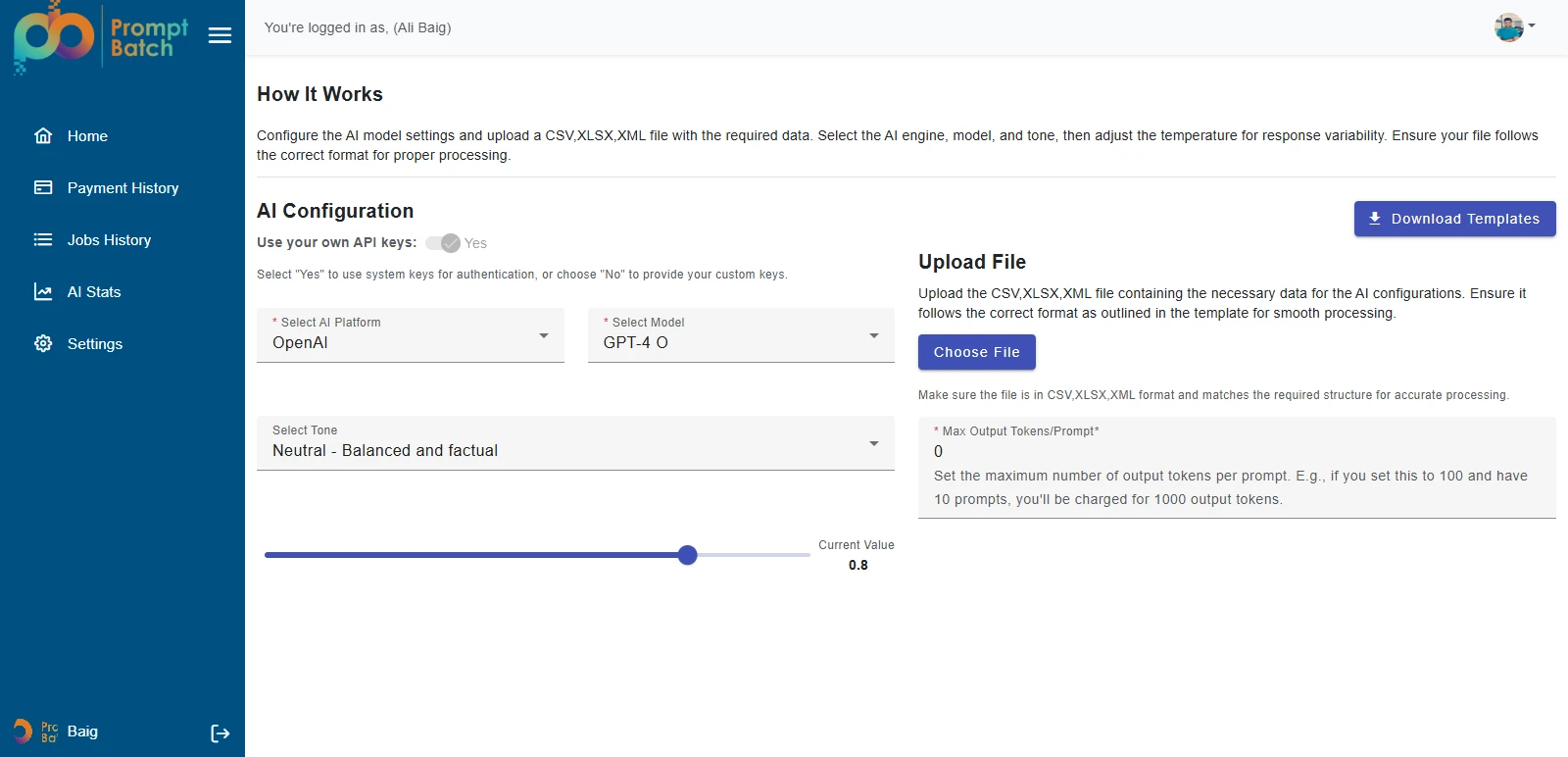
On the main home screen, users set up the batch for submission. They pick the AI platform (OpenAI or Claude), the model (e.g., GPT, 4o), the tone and temperature for response variability, and the maximum output tokens per prompt the main factor to determine the approximate cost.
Suppose the uploaded file contains 100 prompts, and each is allowed up to 100 output tokens, then the total estimated output would be 10, 000 tokens. The portal gets the current rate per million output tokens for the chosen model and works out the total cost plus a small platform fee before the user makes a commitment.
The same method is used for input tokens, so users get a complete upfront cost disclosure down to the last detail with no hidden charges.
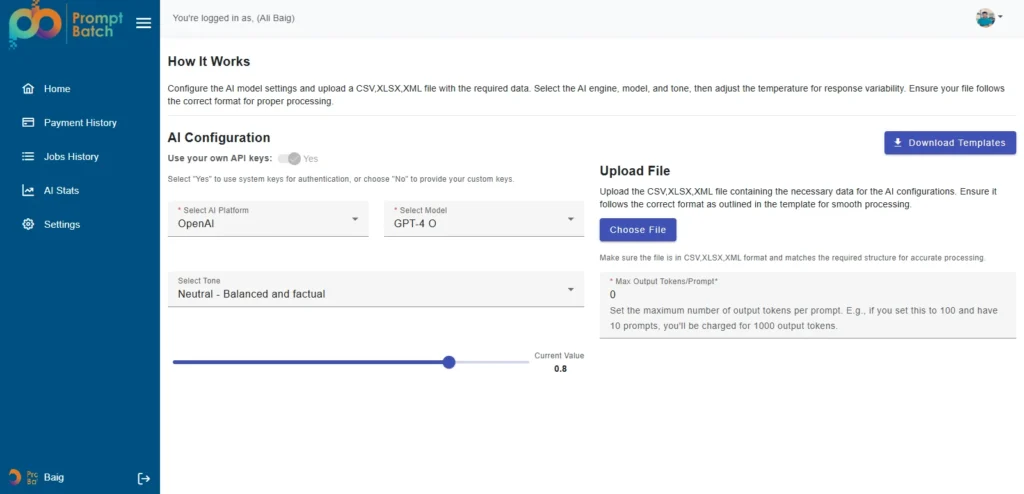
Step 4: Smart Dual Processing Workflow
After the user clicks Proceed, the portal detects the number of prompts in the uploaded file and automatically routes the job through the right workflow:
- 500 or more prompts → Standard batch processing is triggered via the AI provider’s batch API. Processing completes within a maximum of 24 hours at 50% reduced cost. A confirmation pop-up notifies the user of the batch mode.
- Fewer than 500 prompts → Prompts are processed individually in a faster near-real-time flow — so smaller jobs do not have to wait up to 24 hours for results.
- This smart routing ensures every user gets the best balance of speed and cost based on the actual size of their job — automatically, with no manual selection required.
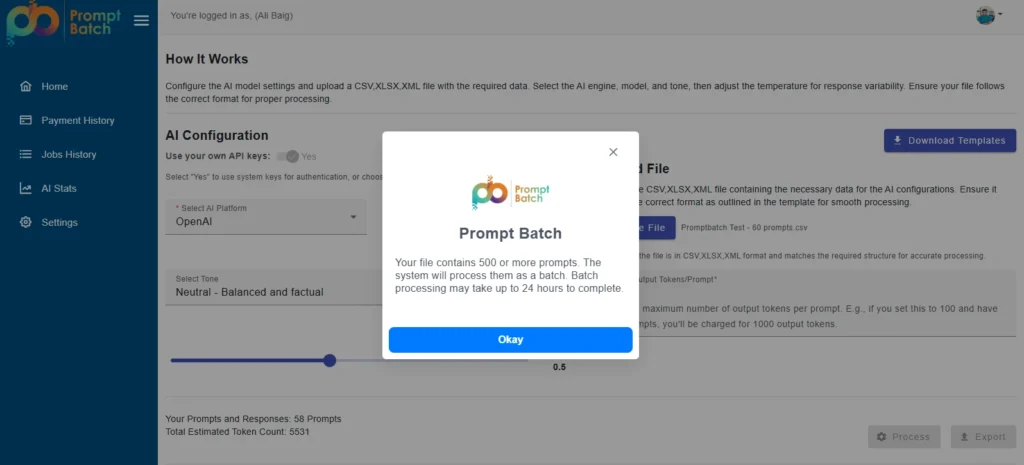
Step 5: Upfront Payment via Stripe
Before any batch is added to the queue, users pay the estimated cost upfront through the integrated Stripe checkout. The Payment Confirmation screen clearly displays the selected AI engine and model, estimated input and output token counts, the rate per million tokens for each, any available credits from previous batches, and the final total amount due.
Upfront payment protects the platform — a company could upload 100,000 prompts with a large output limit and simply not pay after execution, which would cost the platform a significant amount. Advance payment eliminates this risk.
Users also have an option to subscribe for $20 per month, which removes the platform processing fee from every batch they run during that month — an excellent deal for companies that process large volumes regularly
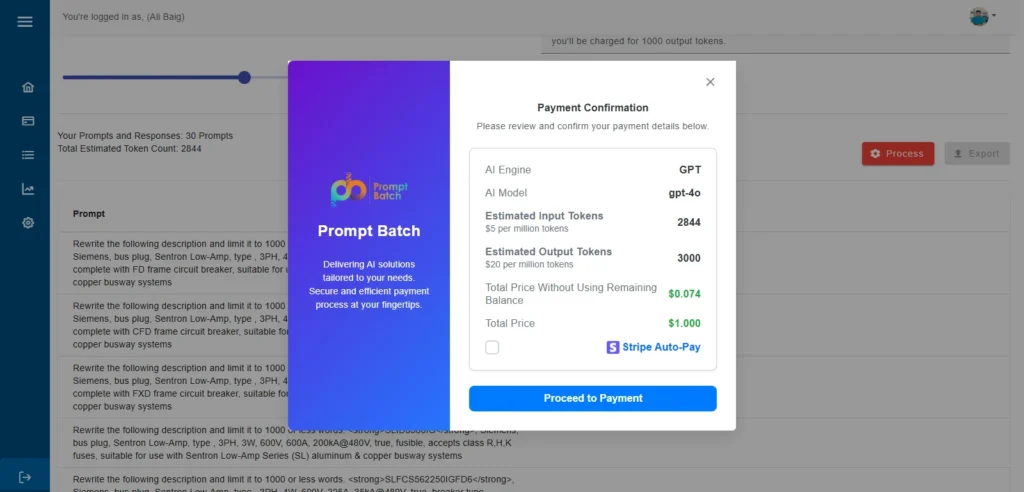
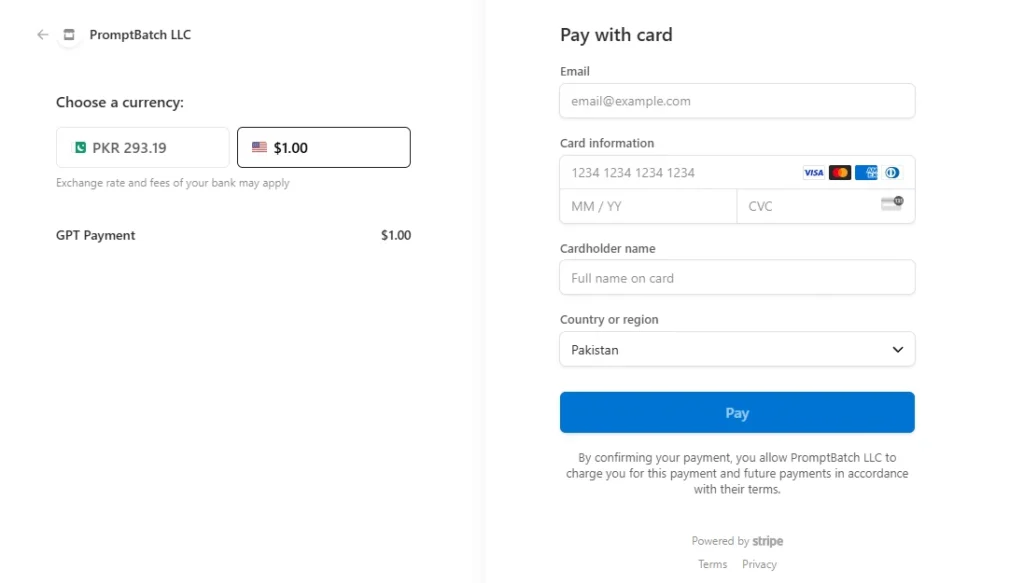
Step 6: Results Delivered & Token Credit System
Once processing is complete, the user receives an email with the output file attached — the same template they uploaded, now with the Response column fully populated with AI-generated answers for every prompt in the batch.
At completion, the portal receives confirmation of the actual tokens consumed by the job. If the actual token usage is less than the estimated amount the user paid upfront, the difference is automatically credited to the user’s account for that specific model and applied against the cost of their next batch automatically.
This token credit system means users are never charged for tokens they did not use, and any savings from one batch carry forward as credit into the next.
Step 7: Jobs History & AI Usage Statistics
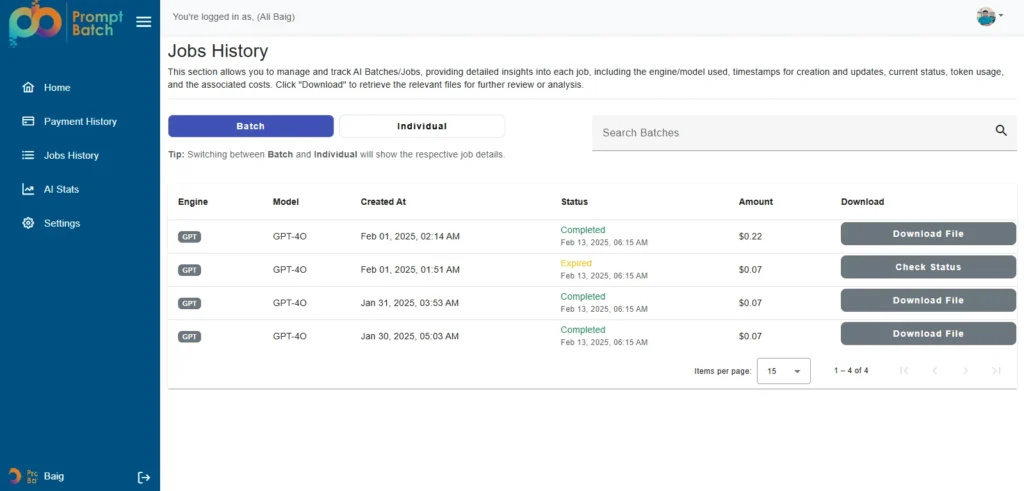
The Jobs History page gives users a complete audit trail of every batch and individual job they have run on the portal — including the AI engine and model used, the creation timestamp, current status (Completed / Processing), the amount paid, and a direct Download File link for completed jobs. Users can switch between Batch and Individual views and search across all jobs instantly.
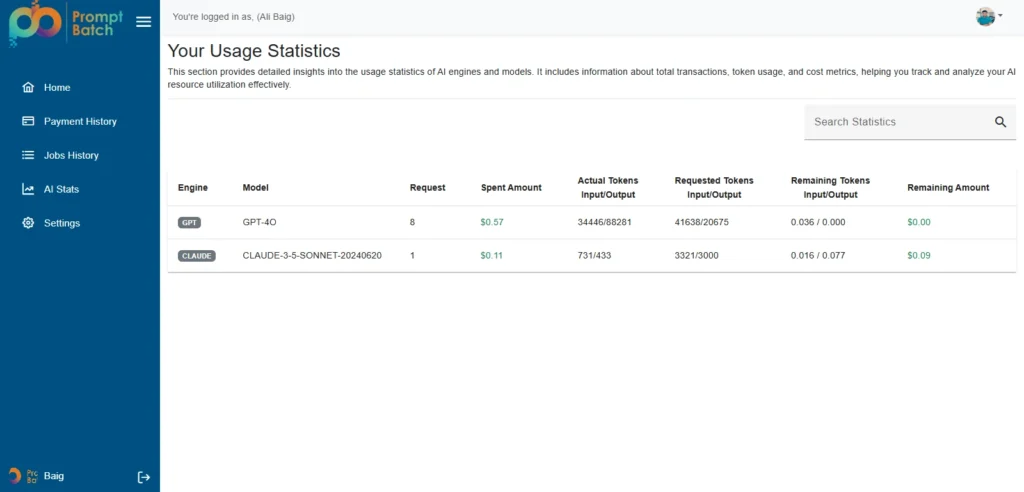
The AI Stats page provides detailed per-model usage analytics — showing total requests made, amount spent, actual vs estimated input and output token counts, the difference between them, and the remaining credit balance for each model. This gives businesses complete visibility into their AI spending without needing to check provider dashboards.
Key Features Built
- Multi-Format File Support — CSV, XLSX, TXT, XML with pre-built downloadable templates (Prompt + Response columns).
- Dual AI Engine Integration — OpenAI (GPT-4o and more) + Anthropic Claude (latest models).
- Bring Your Own API Key — users connect their personal API keys and pay only the platform fee.
- Real-Time Cost Estimation — transparent input and output token calculation before payment.
- Smart Dual Workflow — automatic batch mode for 500+ prompts, fast individual mode for under 500.
- Stripe Payment Integration — secure upfront checkout with optional $20/month subscription.
- Automatic Token Credit System — unused tokens are credited back to the account for the next batch.
- Email Result Delivery — completed output file sent to the user’s email automatically on job completion.
- Jobs History Dashboard — full audit trail with status tracking and direct file download links.
- AI Usage Statistics — per-model analytics showing spend, tokens used, and remaining credit balance.
- Tone & Temperature Control — configurable per batch for response style and variability.
Technology Stack
| Layer | Technology |
|---|---|
| Platform | Web Application |
| AI Integrations | OpenAI API (GPT-4o+), Anthropic Claude API |
| File Formats | CSV, XLSX, TXT, XML |
| Payment Processing | Stripe Checkout + Monthly Subscription |
| Authentication | Email-based Registration & Login |
| Job Notifications | Email Delivery of Completed Output Files |
| Analytics | Per-model token and cost usage dashboard |
The Impact
- Businesses save up to 50% on AI prompt costs versus running prompts individually.
- Any team member can run large AI jobs — no coding skills required.
- Smart dual-workflow delivers fast results for small jobs and maximum savings for large ones.
- The token credit system ensures users are never overcharged.
- Supports both OpenAI and Claude — full flexibility to pick the best model per use case.
- $20/month subscription removes all platform fees for high-frequency users.
About This Project
| Detail | Info |
|---|---|
| Product | PromptBatch Portal |
| Industry | AI Tools / SaaS / Developer Productivity |
| Services Delivered | AI Development, SaaS Web App, Stripe Integration, OpenAI & Claude Integration |
| Platform | Web Application |
| AI Integrations | OpenAI GPT-4o + Anthropic Claude |
| File Formats Supported | CSV, XLSX, TXT, XML |
What the client said:
Here’s the feedback from the customer on this project. See customer feedback.
Ready to Build Something Like This?
At Orbilon Technologies, we build powerful AI-integrated SaaS platforms that cut costs, save time, and scale with your business. Whether you need an AI batch prompt processing app, a custom OpenAI or Claude integration, or a complete SaaS product built from scratch, we deliver with excellence.
Get a Free Quote | AI Development Services | SaaS Product Development | Agentive AI Apps | Contact Us Let’s turn your idea into reality.
Email: support@orbilontech.com
Website: orbilontech.com
Want to Hire Us?
Are you ready to turn your ideas into a reality? Hire Orbilon Technologies today and start working with qualified resources right away. We will take care of everything from design, development, security, quality assurance, and deployment. We are just a click away.