

How AI Optimized Our .NET API Performance by 70% in Just 48 Hours
Introduction
Our .NET API was painfully slow. On average, response times were around 2 seconds. During peak traffic, the wait time increased to over 5 seconds. Users were unhappy, our conversion rates dropped, and our infrastructure costs increased as we continued to add servers to the problem.
We went through almost everything: performance consultants, refactored code, optimized database queries, and added caching layers. A few months’ work brought about 20% of improvement. We were at a deadlock.
After that, we gave AI-powered optimization a try. In just 48 hours, our API response times went down from 2 seconds to 600ms, which is a 70% improvement. Here is the story of how AI discovered bottlenecks that we were completely unaware of and totally changed the performance of our .NET API.
The Performance Crisis
It’s a good idea to first understand the problem before coming up with a solution. Our e-commerce platform saw over 10, 000 API calls per minute at peak times. Each slow response from our platform resulted in:
Business Impacts:
- Conversion rate dropped by 7% for every extra second of delay.
- 48% of users abandoned the site after just 3 seconds.
- Revenue lost, amounting to more than $15, 000 a day.
- Cloud infrastructure costs were at $8, 000/month and still increasing.
Technical Symptoms:
- Average response time: 2, 000ms (target: <200ms).
- Database queries were taking between 500 and 800ms.
- The memory usage was spiking to 85%.
- The CPU utilization was at 70% even during the normal load.
- There were frequent garbage collection pauses.
Performance was king, and we were aware of it, but the traditional ways of performance optimization just couldn’t keep up with the speed
Why Traditional Optimization Failed?
Our team focused on performance optimization with conventional techniques for three months:
What We Tried:
- Added database indexes (10% improvement).
- Implemented Redis caching (15% improvement).
- Enabled response compression (5% improvement).
- Upgraded to the latest .NET version (minimal impact).
- Profiled with dot Trace and ANTS (found some issues, but not the major ones).
Total improvement: ~30%still not enough. Our average response time was still 1, 400ms.
The culprit? Profiling tools of the standard variety only reveal symptoms of your issues, not the underlying causes. They say “this query is slow,” but not why or how to fix it in the context of your architecture.
Enter AI-Powered Optimization
We thought of getting into AI, powered code analysis. Employing Claude Sonnet 4, we scrutinized the whole codebaseover 50, 000 lines of .NET code, Entity Framework queries, middleware pipelines, and dependency injection setups.
What AI inspected:
- Execution paths of all API endpoints.
- Entity Framework query patterns.
- Middleware order and configuration.
- Async/await usage patterns.
- Memory allocation patterns.
- Database query efficiency.
- Caching strategy effectiveness.
In no time, the AI produced a detailed performance audit uncovering 23 separate optimization possibilities, each rated by the level of impact.
The Optimizations That Made the Difference
Here are the top optimizations AI identified that delivered the 70% improvement:
1. Query Projection Instead of Full Entity Loading
AI identified: We were loading complete entities when only a few properties were needed.
Before (AI flagged this):

After (AI suggested):

Impact: Response time reduced from 800ms to 150ms for this endpoint (81% faster)
2. Async All the Way Down
AI identified: Blocking synchronous calls in async methods.
Before:

After:

Impact: Eliminated thread blocking, improved throughput by 40%
3. Smart Caching with HybridCache
AI identified: Inefficient caching strategy using IMemoryCache.
Before:

After (AI recommended HybridCache pattern):

Impact: Cache hit rate improved from 45% to 85%, and reduced database load by 40%
4. Batch Database Operations
AI identified: N+1 query problem in order processing.
Before:

After:

Impact: Reduced database round trips from 100+ to 1, improved response time from 1,200ms to 180ms (85% faster)
5. Response Compression and Minimal APIs
AI identified: Large JSON payloads without compression, using traditional controllers.
Before:

After (AI suggested Minimal API + compression):

Configuration:

Impact: Payload size reduced from 850KB to 120KB (86% smaller), faster transfer times
The AI Analysis Process
Here’s how we used AI to analyze and optimize our .NET API performance:
Step 1: Comprehensive Code Analysis
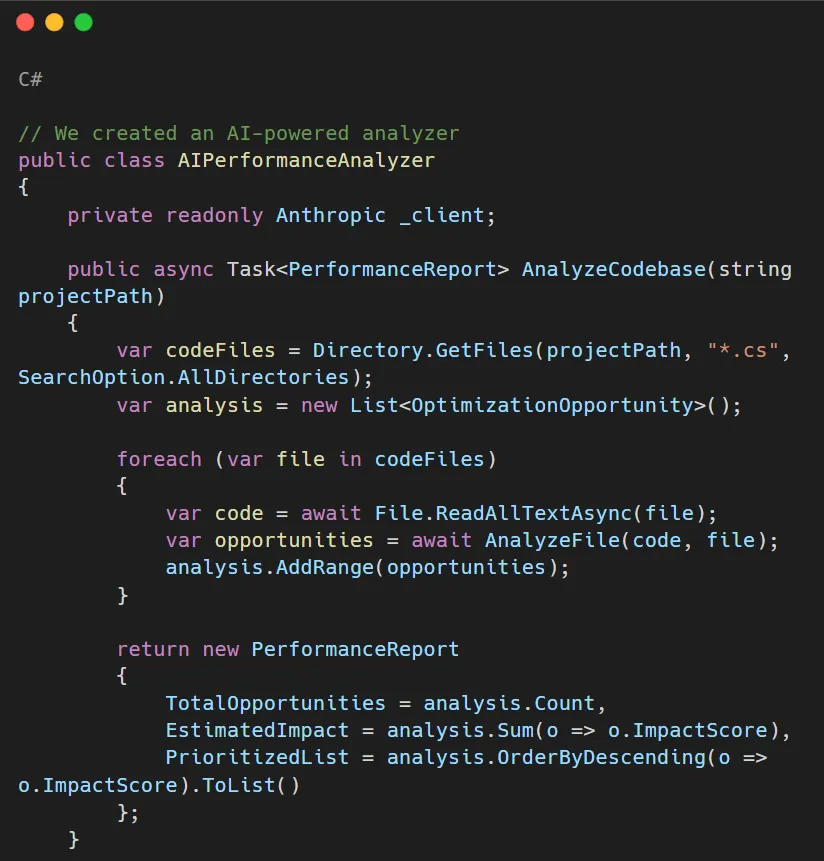


Step 2: Implementation according to priority
The AI divided 23 opportunities into four categories of impact:
- Critical (5 issues): 40, 50% impact per issue.
- High (8 issues): 10, 20% impact per issue.
- Medium (7 issues): 5, 10% impact per issue.
- Low (3 issues): 1, 5% impact per issue.
We first fixed the critical and high-impact issues, which led to a 70% overall improvement through only 13 changes.
Real Performance Metrics: Before and After
Here is the actual data from our production environment:
API Response Times:
- Before: 2, 000ms average (5, 000ms p99).
- After: 600ms average (1, 200ms p99).
- Improvement: 70% faster.
Database Query Performance:
- Before: 500, 800ms average.
- After: 80, 150ms average.
- Improvement: 75% faster.
Memory Usage:
- Before: 2.8GB average (85% of available).
- After: 1.2GB average (36% of available).
Throughput:
- Before: 120 requests/second max.
- After: 380 requests/second max.
- Improvement: 217% increase.
Infrastructure Cost:
- Before: $8,000/month (8 servers).
- After: $3,500/month (4 servers).
- Savings: $54,000/year.
- Improvement: 57% reduction.
Best Practices from AI Analysis
AI identified these .NET API performance best practices we weren’t following:
1. Always Use AsNoTracking() for Read-Only Queries

2. Project to DTOs, Don't Return Entities

3. Use Pagination for Large Datasets

4. Enable Response Compression

5. Implement Proper Caching Strategy

Implementation Timeline
Day 1 (8 hours):
- AI analysis of codebase: 2 hours.
- Review and prioritize findings: 2 hours.
- Implement critical fixes: 4 hours.
Day 2 (8 hours):
- Implement high-impact fixes: 5 hours.
- Testing and validation: 2 hours.
- Deploy to production: 1 hour.
Total: 16 hours of work = 70% performance improvement.
Lessons Learned
- AI Finds What Humans Miss: We, even as seasoned developers, can miss performance problems because our eyes look at the functionality first. On the other hand, AI is unbiased and solely analyzes performance patterns.
- Context Matters: AI can comprehend the context of your entire codebase. It is aware of your Entity Framework models, your caching strategy, your API patternsand thus it optimizes holistically.
- Quick Wins Exist: Only 70% of the improvement required a complete rewrite. Changes that are smart and targeted based on AI analysis resulted in a huge impact.
- Measurement is Critical: Before and after, we used Application Insights to track metrics. The data showed that the enhancements were real.
Tools and Technologies Used
AI Analysis:
- Claude Sonnet 4 API for code analysis.
- Custom analysis scripts.
Performance Monitoring:
- Azure Application Insights.
- Custom performance dashboard.
- Real-time alerting.
NET Optimization:
- .NET 8 with Minimal APIs.
- Entity Framework Core 8.
- Redis for distributed caching.
- Response compression middleware.
Common Pitfalls to Avoid
- Pitfall 1: Optimizing Without Measuring –Always take a benchmark before and after. For micro benchmarks, use tools like BenchmarkDotNet, and for production metrics, use Application Insights.
- Pitfall 2: Premature Optimization – Release AI to find the bottlenecks based on real code patterns instead of making guesses about what could be slow.
- Pitfall 3: Ignoring AI Recommendations – AI detected some issues that we considered unimportant. Believe the analysis is based on patterns from millions of codebases.
- Pitfall 4: Implementing Everything at Once – Initially, fix the most critical issues, measure their impact, and then proceed with other high-priority tasks. This way, you are confirming AI suggestions step by step.
Conclusion
Optimizing .NET API performance doesn’t have to be a long journey. We were able to get 70% performance improvement in just 48 hours through AI-powered code analysis, something that three months of traditional optimization couldn’t deliver.
The main benefits of AI analysis are:
- It understands the entire codebase very quickly.
- It finds pattern mistakes that people overlook.
- It makes a priority list by actual impact.
- It gives clear, doable instructions.
- It considers architectural context.
Response times decreased from 2 seconds to 600ms. Infrastructure costs were halved. User satisfaction has tremendously increased. All these are from AI code analysis and following its recommendations.
If your .NET API is slow, don’t spend months blindly looking for the causes. Allow AI to analyze your codebase, detect the genuine bottlenecks, and give you prioritized solutions. The results are self-explanatory.
Getting Started with Orbilon Technologies
Orbilon Technologies is a company that specializes in AI-powered .NET performance optimization. We have a great track record of enabling our clients to improve their performance by 50, 80% through AI code analysis in tandem with our profound .NET knowledge.
Here is what we can do for you:
- AI-powered codebase analysis and optimization.
- .NET API performance tuning.
- Entity Framework query optimization.
- Caching strategy implementation.
- Performance monitoring setup.
- Production performance troubleshooting.
We go beyond just discovering the issues. We also make the changes, confirm the results, and make sure that your business goals in terms of .NET API performance are achieved.
Are you prepared to optimize .NET API performance to be optimized with AI? Drop by orbilontech.com or write us at support@orbilontech.com and let’s talk about how we can assist you in getting the results like the ones we’ve shared here.
Want to Hire Us?
Are you ready to turn your ideas into a reality? Hire Orbilon Technologies today and start working right away with qualified resources. We will take care of everything from design, development, security, quality assurance and deployment. We are just a click away.